2.8 VESA-mount installation

Caution: Use suitable mounting apparatus to avoid risk of injury.
Warning: Never move a display attached to an arm by pulling or pushing the display itself. Instead, make sure that the arm is equipped with a VESA compliant handle and use this to move the display.

Please refer to the instruction manual of the arm for more information and instructions.

Warning: Use an arm that is approved by VESA (according to the VESA 200 x 100 mm or VESA 100 x 100 mm standard).

Use an arm that can support the weight of the display. Refer to the technical specifications of this display for the applicable weight.

Caution: You should mount the panel in landscape position. Portrait position is possible but not supported.
Warning: To avoid muscle strain or back injury, use lifting aids and proper lifting techniques when removing or replacing.
Overview

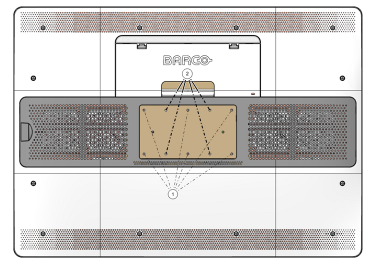
The panel, standard attached to the tilt & swivel foot, is compatible with the VESA 200 x 100 mm and VESA 100 x100 mm standard. So it can be used with an arm stand according to the VESA 200 x 100 mm or VESA 100 x 100 mm standard.

Therefore, the tilt & swivel foot must be removed from the panel.

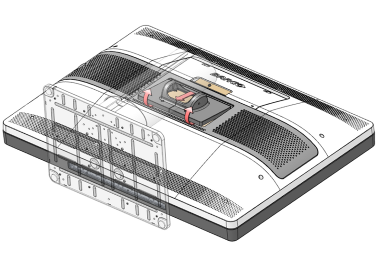
  1. Fasten the height mechanism of the foot by putting the red pin in the hole.
  2. Put the display face down on a clean and soft surface. Be careful not to damage the panel screen.
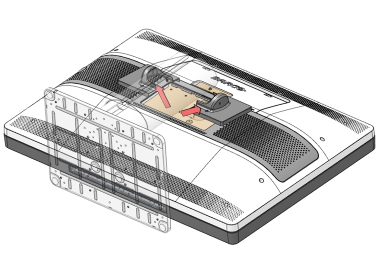
  3. Loosen the plastic covers with a cross head screwdriver.
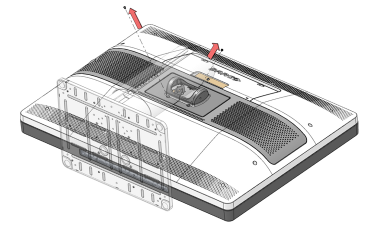
  4. Remove the two plastic covers.

  5. Remove the 9 screws fixing the foot while supporting the foot.
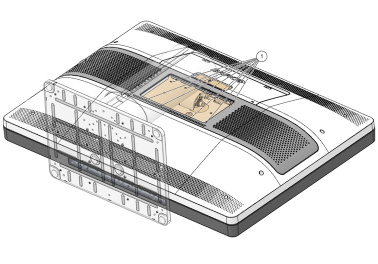
  6. Attach the arm stand firmly to the panel using 6 screws M4 x 6 mm for a 200 x 100 mm VESA solution or 4 screws M4 x 6 mm for a 100 x 100 mm VESA solution.