
5.1 Repackaging instructions
Overview of the packaging
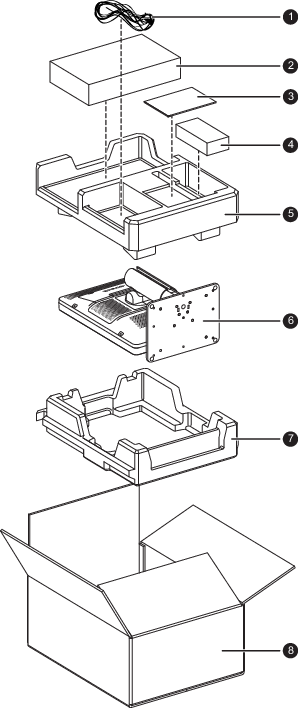 Image 5–1
 - Video and power cables
- Display controller box
- System CD('s) and user guide
- Power supply
- Top buffer
- Display
- Bottom buffer
- Box
To repack your display
- Place the empty box on a stable surface.
- Place the bottom buffer in the box.
- Put the display in its original bag and place it in the box with the panel facing downwards.
- Put the top buffer on top of the display.
- Put the power supply in the dedicated cavity of the top buffer.
- Put the video and power cables in their original bag and put them in the dedicated cavity of the top buffer.
- When applicable, put the display controller box in the dedicated cavity of the top buffer.
- Put the system CD('s) and user guide in their original bag and place it in the dedicated cavity of the top buffer.
- Close and seal the box.