3.3 Video input connection

Warning: When the display is assembled in the medical system, take care of the anchorage of all cables, to avoid unwanted detachment.
To connect the video inputs
  1. Connect the available display(s) to the corresponding video input(s) using the appropriate video cable(s).
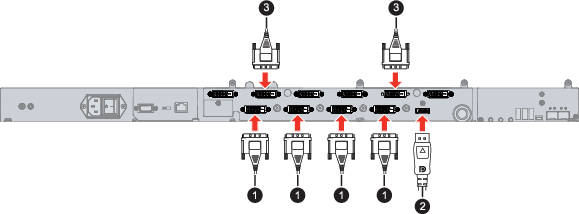
    Image 3–2
Overview possible inputs
  1. DVI
  2. DisplayPort
  3. DVI splitter
Note: To connect the SFP+ 10 Gigabit video-over-IP optical interface, please refer to the “MNA-240 User Guide” “(reference K5903061)”.