About the OSD menu lock
The OSD menu can be locked for access, see “OSD menu lock”. If the OSD menu lock is enabled, entering the OSD menu will display a ' Request for password' window.

The OSD menu can be locked for access, see “OSD menu lock”. If the OSD menu lock is enabled, entering the OSD menu will display a ' Request for password' window.
Touch the Enter key.
As a result, the dialog box as shown below comes up if the OSD menu is password protected, see “OSD menu lock”.

Enter the password by using the four right keys of the keyboard, you can label the four keys as 1, 2, 3 and 4 (from left to right). So, if i.e. keycode is '4444', it means you have to press four time the Esc key.
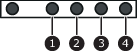
If the inserted password is not correct, the dots become red.