About adding Base Units
New Base Units on the network can be added to the XMS (virtual) Edge.
Auto-discovering is supported for CSE devices.

New Base Units on the network can be added to the XMS (virtual) Edge.
Auto-discovering is supported for CSE devices.
When the overview window is not open yet, click on Base Units in the menu bar.
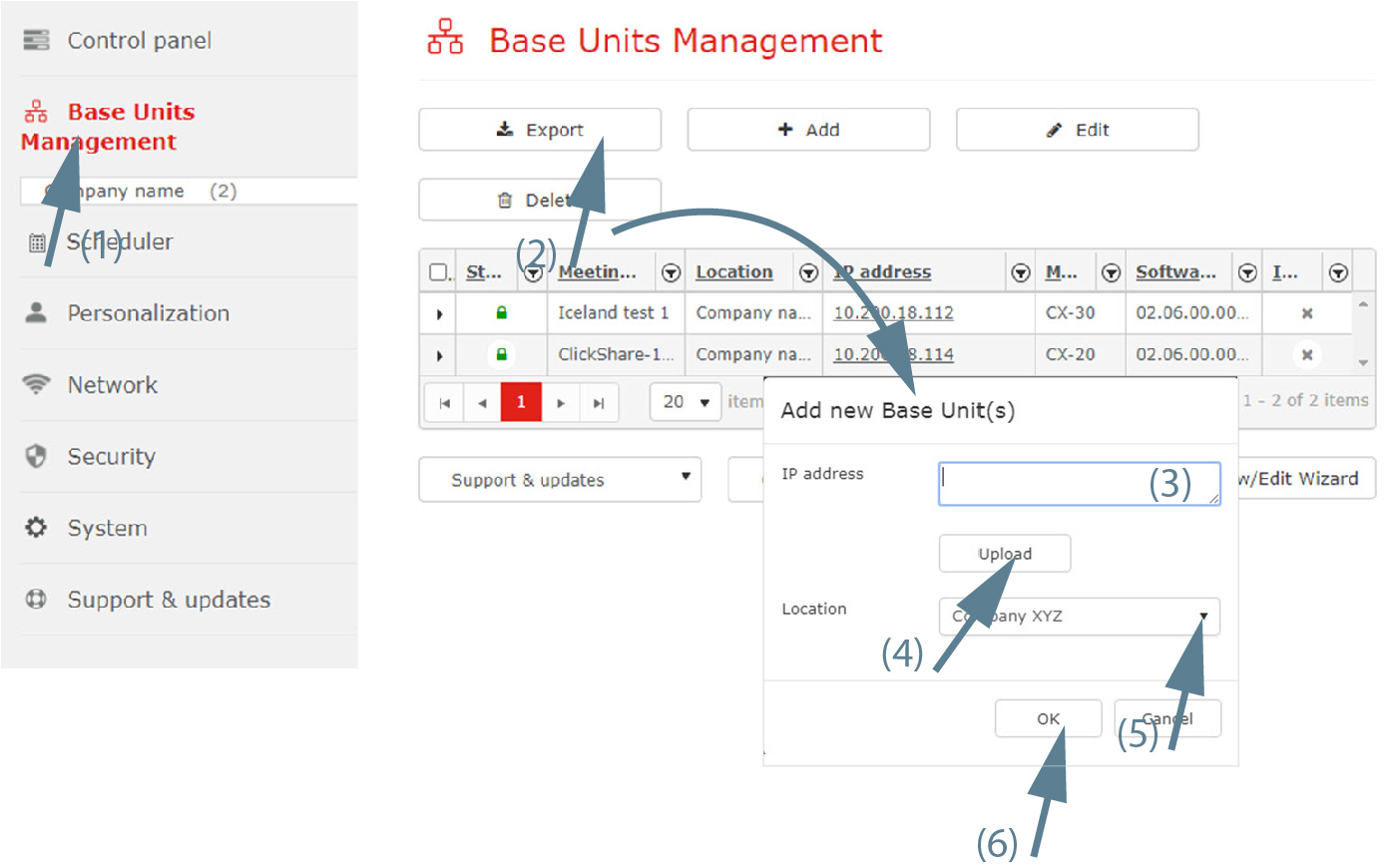
An overview of the current coupled Base Units is shown.
Click on the “+ Add” button to add a Base Unit.
The window opens.
Click in the input field next to (3) and enter the IP address or hostname of the Base Unit to be added. Multiple Base Units can be added at the same time by entering the different hostnames or IP addresses separated by a comma (there is no limitation in the number of Base Units).
if you have a text file where each line contains an IP address or hostname , click on Upload (4) and select this file and click on Open. After uploading information from file, Base Units must appear into IP address field (no limitation in the number of Base Units).

Click OK (6) to add the Base Unit(s) to the overview list.
It may take some time before all details of the Base Units are shown, since this data is acquired in the next polling cycle. The polling interval can be set by the IT admin
The IT admin can choose between identifying Base Units by or in → page.