EAP-TLS (Transport Layer Security) is an EAP method based on certificates which allows mutual authentication between client and server. It requires a PKI (Public Key Infrastructure) to distribute server and client certificates. For some organizations this might be too big of a hurdle, for those cases EAP-TTLS and PEAP provide good alternatives. Even though a X.509 client certificate is not strictly required by the standard it is mandatory in most implementations including for ClickShare. When implemented using client certificates, EAP-TLS is considered one of the most secure EAP methods. The only minor disadvantage, compared to PEAP and EAP-TTLS, is that the user identity is transmitted in the clear before the actual TLS handshake is performed. EAP-TLS is supported via SCEP or manual certificate upload.
How to setup EAP-TLS
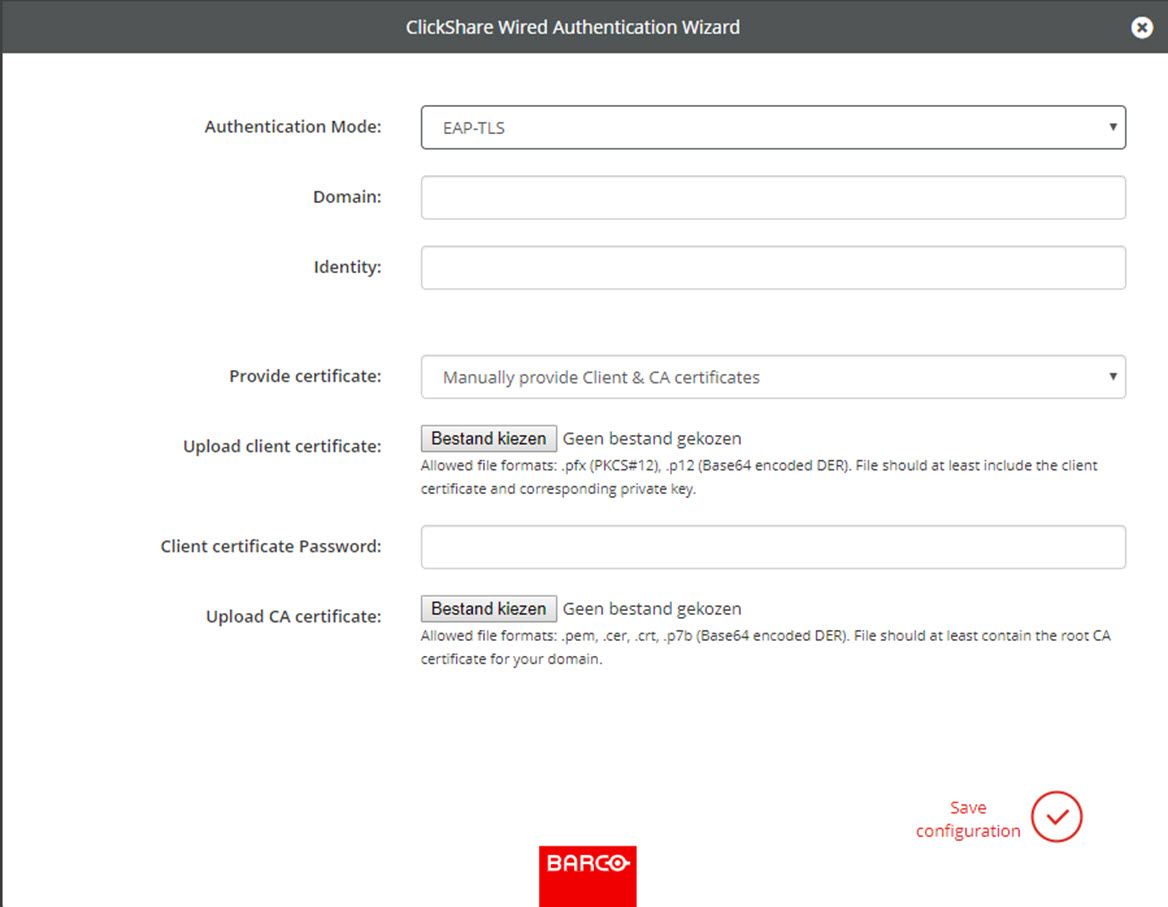
Select Authentication Mode EAP-TLS.
Image 6–23EAP-TLS
Fill out the Domain and Identity.
Select the certification method. Click on the drop down box and select the desired method.
Manually provide Client & CA certificates
Auto enrollment via SCEP
Manually providing certificates
Upload client certificate. Click on Choose file and browse to the desired file.
Allowed file formats:
.pfx (PKCS#12)
.p12 (Base64 encoded DER)
The should at least include the client certificate and corresponding private key.
Enter the Client certificate Password.
Upload CA certificate. Click on Choose file and browse to the desired file.
The following formats are allowed:
.pem
.cer
.crt
.pb7 (Base64 encoded DER)
File should at least contain the root CA certificate for your domain.
Save configuration
Using Auto enrollment
The Simple Certificate Enrolment Protocol (SCEP) is a protocol which enables issuing and revoking of certificates in a scalable way. SCEP support is included to allow a quicker and smoother integration of the ClickShare Base Unit and Buttons into the corporate network.
Up until Base Unit firmware version 02.11.01 the SCEP implementation was specifically targeted at the Network Device enrollment Service (NDES) which is part of Windows Server. From Base Unit firmware version 02.12.00 and later we support both NDES and standard SCEP.
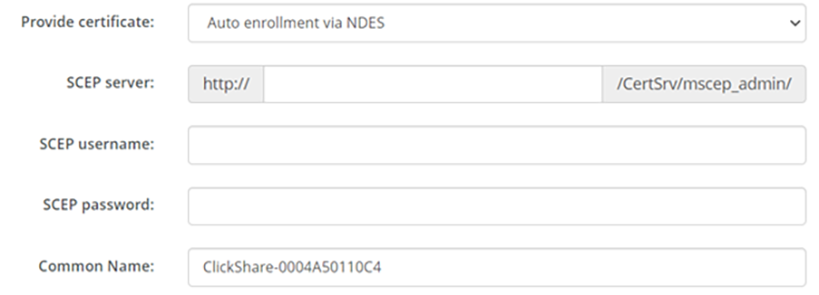
NDES requires the following parameters:
SCEP Server: This is the IP or hostname of the Windows Server in your network running the NDES service. Only http is allowed. E.g.: http://myserver or http://10.192.5.1
SCEP username: This is a user in your Active Directory which has the required permission to access the NDES service and request the challenge password. To be sure of this, the user should be part of the CA Administrators group (in case of a stand-alone CA) or have enrol permissions on the configured certificate templates.
SCEP Password: The corresponding password for the SCEP username that you are using to authenticate on service.
Common Name: The identity you want to link to the certificate.
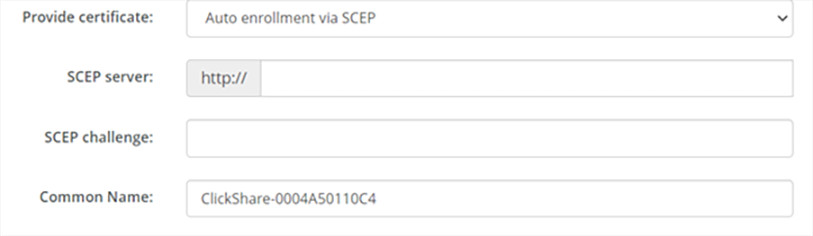
SCEP Server: This is the IP or hostname of Server the server running the SCEP service with the port and suffix appended. Only http is allowed. E.g.: http://myserver:8080/scep or http://10.192.5.1/test
SCEP Challenge: The corresponding SCEP challenge password.
Common Name: The identity you want to link to the certificate.