
Overview
In this default mode, the ClickShare Base Unit and Button(s) operate directly out of the box, without any integration in the Enterprise network. Users can connect directly to the Base Unit Wi-Fi via the ClickShare Buttons, using the ClickShare App or with their mobile devices using Airplay or Google Cast.
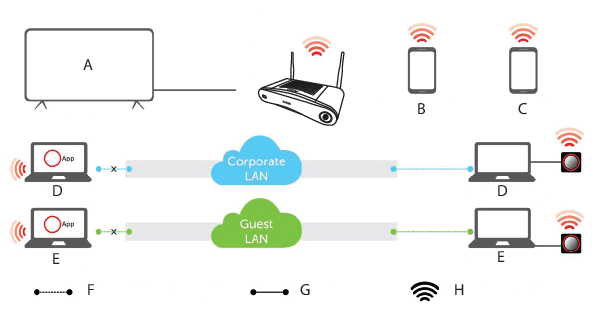
- A
- Meeting room screen
- B
- Employee mobile
- C
- Guest mobile
- D
- Employee laptop
- E
- Guest laptop
- F
- Wireless or Ethernet connection
- G
- Ethernet connection
- H
- Wireless connection
Note: Using a ClickShare Button allows you to stay connected to the internet. Using the ClickShare App, Airplay or Google Cast will require connecting to the Base Unit directly and will only be able to access the internet if the device supports to use data (3G/4G) at the same time. For an improved user experience, it is highly recommended to connect an Ethernet cable to the Base Unit.
Using the ClickShare Base Unit and Buttons directly out of the box is ideal for temporary setups, visitor centers and small to medium installations without network integration needs or possibilities. This setup requires the least installation effort and keeps any shared data completely separated from your Enterprise network. Updating and configuring the Base Units will need to be done manually.