
Overview
In this extended out-of-the-box mode, an Ethernet connection is made between the ClickShare Base Unit and the corporate network. The ClickShare Base Unit Wi-Fi is kept enabled, ensuring users can still connect directly to the Base Unit Wi-Fi via the ClickShare Buttons, using the ClickShare App, Miracast, Airplay or Google Cast. Employee computers running the ClickShare App and employee mobile devices using Airplay or Google Cast can connect via the corporate LAN.
Note: Using a ClickShare Button allows guests to stay connected to the Guest LAN and thus retain internet connectivity. Guest mobile devices will usually need to connect to the Base Unit directly and will only be able to access the internet if the device supports to use data (3G/4G) at the same time.
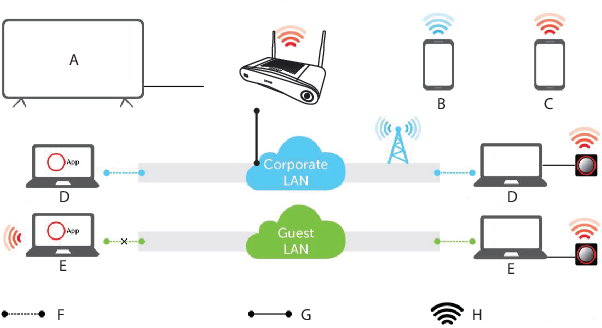
- A
- Meeting room screen
- B
- Employee mobile
- C
- Guest mobile
- D
- Employee laptop
- E
- Guest laptop
- F
- Wireless or Ethernet connection
- G
- Ethernet connection
- H
- Wireless connection
Using the ClickShare Base Unit and Buttons directly out of the box is ideal for temporary setups, visitors' centers and small to medium installations without network integration needs. The Ethernet connection allows employees to use the ClickShare App without switching their Wi-Fi network, as well as central management via XMS and for auto-updates. Guest BYOD users will usually not be able to share with the ClickShare Base Unit unless they switch their Wi-Fi connection to the Base Unit SSID.