User Interface functionality
When a Button is plugged in or the ClickShare desktop app is running and ready for sharing (not sharing yet), additional functionality (context menu) can be selected via the hamburger menu icon.

When a Button is plugged in or the ClickShare desktop app is running and ready for sharing (not sharing yet), additional functionality (context menu) can be selected via the hamburger menu icon.
Click on the menu icon on the Ready to share message.
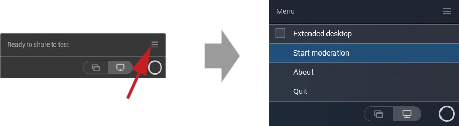
The context menu appears.