Advanced functionality
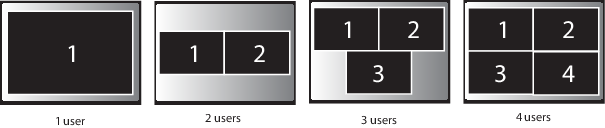
Depending on the display mode, ClickShare can show the content of up to four sources (clone mode) or up to eight source (extended mode) on the meeting room display(s) at the same time. A source can be a wireless source, via the a ClickShare Button or either an iPad or android device sharing via the ClickShare app, or HDMI input source. This means by clicking their Button, clicking the virtual button in the ClickShare app, four or eight persons in the meeting room can display their screens simultaneously. They appear as follows:
For a meeting room with a single display:
For a meeting room with a dual display in extended mode:
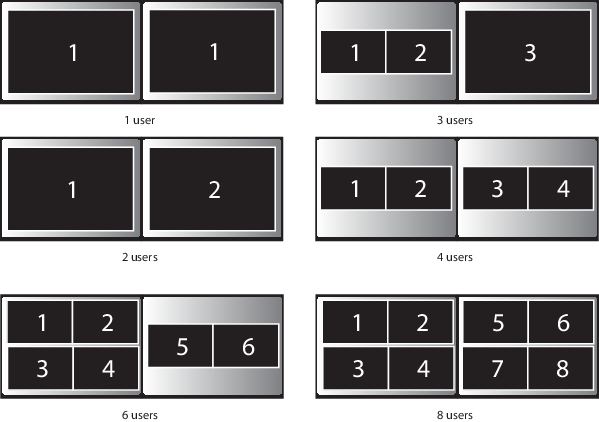
When the display mode is set to extended,if you are the ninth user, you are blocked. A message appears on your screen telling you the maximum number of users is reached. You have to wait until one other the other users removes his content or you display your content full screen removing all the others.
For a meeting room with a dual display in clone mode:
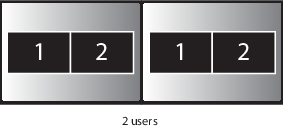
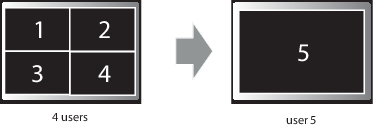
When the display mode is set to clone, if you are the fifth user who wants to share his screen, you are blocked. A message appears on your screen telling you the maximum number of users being displayed simultaneously has been reached. You can decide to wait until one of the four users removes his content from the display or you can decide to show your content full screen. In that case, the four screens that were being displayed are removed and your screen is displayed full screen.
For a meeting room with a dual display in span mode:
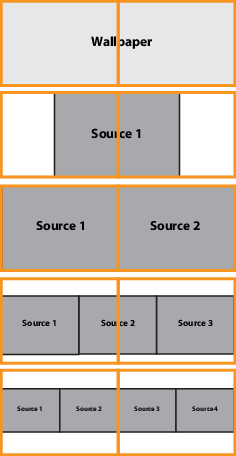
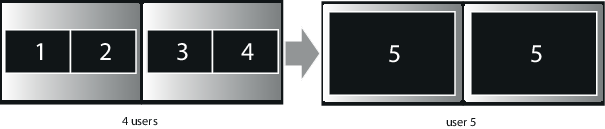
When the display mode is set to span, the sources are divided over both screens as shown in the drawing. The sources are always displayed in a row and only four sources can be displayed.