
HDMI connection
Connect an “HDMI” cable from the “HDMI out” port of the Base Unit to the “HDMI in” port of the display. (reference 1)
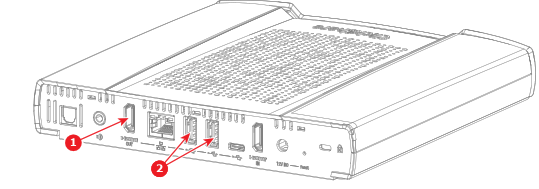
Image 5–3 Location of the HDMI connector and USB-A connector for touch screens only - 1
- Connection for the HDMI cable
- 2
- Connection options for the touch screen USB-A cable
When the display is correctly configured, the ClickShare setup splash screen will be displayed on the monitor.
Is the display a touch screen?
- Yes, connect a “USB-A” cable to one of the “USB-A” ports of the Base Unit. (reference 2, )
- No, the HDMI connection has been made.