5.3.5 Standalone peripherals

About peripherals

ClickShare can interface and connect with multiple types and brands of peripherals. A list of officially supported peripherals can be found here: https://www.barco.com/en/products/clickshare-conferencing-collaboration/alliance-partners/peripherals.
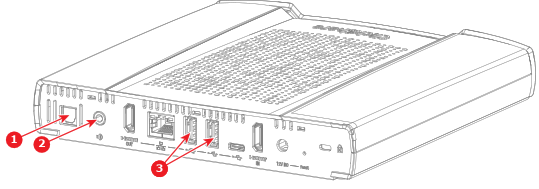
How to connect
  1. Which connection is required for the peripheral?

    • Digital audio connection, connect the optical audio cable to the “digital audio” port. (reference 1)
    • AUX connection, connect the AUX cable to the “AUX” port. (reference 2)
    • USB connection, connect the USB cable to one of the two “USB-A” ports. (reference 3)
    Image 5–6 Location of the peripheral connectors
    1
    Connection for the optical audio cable
    2
    Connection for the AUX cable
    3
    Connection options for the USB-A cables
  2. Ensure audio is enabled in the ClickShare configurator. For more information, see “Audio”.