4.8.4 Export

Location and availability
About export

Exporting enters all information and configurations known about the Control Panel in an export file.

How to export
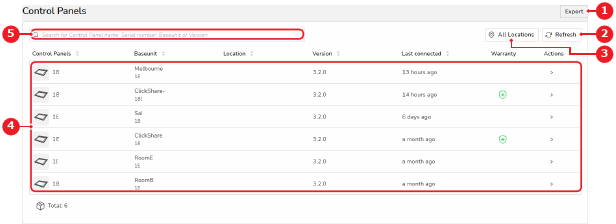
  1. Click Export (reference 1).

    Image 4–61
    1
    Export button
    2
    Refresh button
    3
    Location tree overview
    4
    Control Panel list
    5
    Control Panel search box

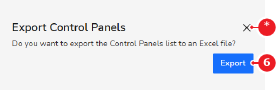
    A confirmation pop-up is shown.

  2. Click Export (reference 6).

    Image 4–62
    6
    Confirmation button
    *
    Cancel button

    A pop-up is shown.

  3. Save the .xlsx in an easy-to-find location using the pop-up.