5.3.2 Display connections

About display connections

There are two ways to connect a display to the Base Unit:

HDMI connection
  1. Connect an “HDMI” cable from the “HDMI out” port of the Base Unit to the “HDMI in” port of the display. (reference 1)
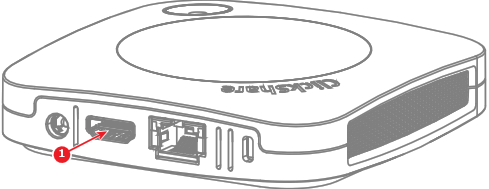
    Image 5–7 Location of the HDMI connector
  2. Is the display a touch screen?

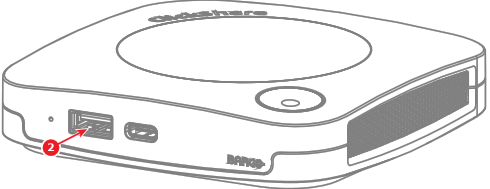
    • Yes, connect a “USB-A” cable to the “USB-A” ports of the Base Unit. (reference 2)
    • No, the HDMI connection has been made.
    Image 5–8 Location of the USB connector for touch screens
USB-C connection
  1. Connect a display to the “USB-C” port of the Base Unit with a “USB-C” cable or “USB-C to HDMI” dongle. (reference 1)
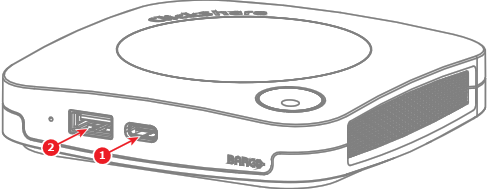
    Image 5–9 Location of the USB-C cable or dongle connector and USB-A connector for touch screens only
    1
    Connection for the USB-C cable or USB-C to HDMI dongle
    2
    Connection options for the touch screen USB-A cable
  2. Is the display a touch screen?

    • Yes and the touch functionality is supported via the “USB-C” connection.
    • Yes and the touch functionality is not supported via the “USB-C” connection, connect a “USB-A” cable to the “USB-A” port of the Base Unit. (reference 2, Image 5–9)
    • No, the USB-C connection has been made.