About LAN connection
Connecting the CX-20 Gen2 to the LAN, allows for the configuration and management of the Base Unit remotely.

Connecting the CX-20 Gen2 to the LAN, allows for the configuration and management of the Base Unit remotely.
Connect an “ethernet” cable from the LAN to the “ethernet” port at the back of the Base Unit. (reference 1)
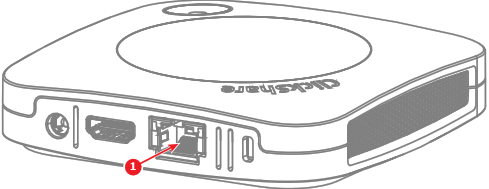
Connect the other end of the ‘ethernet’ cable to one of the following options:
Navigate to the IP address with a browser of choice.
