About the pairing
Button(s) must be paired with a Base Unit before they will work. An unpaired Button will not be able to share content nor connect to ClickShare.


Button(s) must be paired with a Base Unit before they will work. An unpaired Button will not be able to share content nor connect to ClickShare.
Connect the Button to an available “USB-C” port of the Base Unit.

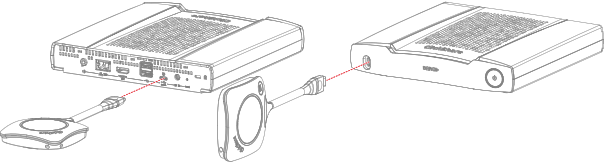
If a display is attached a notice “Busy pairing and updating” will appear at the bottom of the splash screen.
Wait until the circle of the Button turns solid green
If a display is attached a notice “Finished pairing and updating Button.” will appear at the bottom of the screen.
Unplug the Button from the Base Unit.
The Button is now ready to be used!