
How to select
With the Warping menu displayed, use the ▲ or ▼ key to select more or less pixels to adjust.
Switching between the more or less pixels icon can be done with the ◄ or ► key.
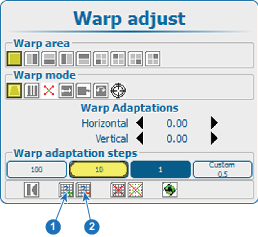
Image 13–37 Warp level selection - 1
- Increment pixels
- 2
- Decrement pixles
The current selected icon shows blue.
Press ENTER to increment or decrement the number of pixels.
The value inside the icon changes accordingly.
The following selections are possible:
- 2 x 2 (highest level);
- 3 x 3;
- 5 x 5;
- 9 x 9;
- 17 x 17;
- 33 x 33 (lowest level).