
How to install
- Remove the foam rubber in the opening of the lens holder if not removed yet.
- Take the lens assembly out of its packing material and remove the lens caps on both sides.
Place the lens holder in the “unlocked” position by moving the lens lock handle (A) towards the lens power supply socket (B) as illustrated.
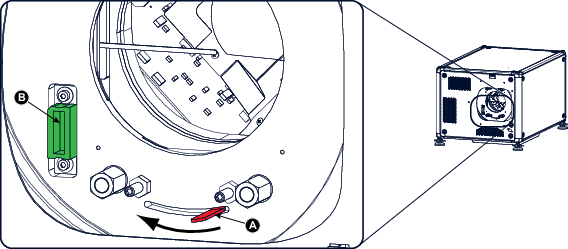
Image 4–11 Lens installation, preparation Ensure that the lens holder stands in the On-Axis position (horizontal and vertical mid position).

Gently insert the lens in such a way that the lens connector matches the socket (B).
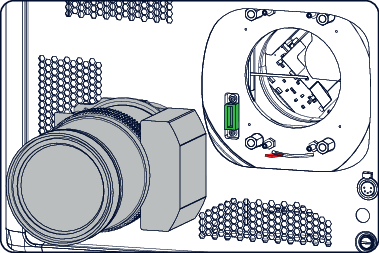
Image 4–12 Lens insertion Insert the lens until the connector seats into the socket.

Secure the lens in the lens holder by sliding the lens lock handle into the “locked” position, which is away from the lens power supply socket. Ensure the lens touches the front plate of the lens holder.
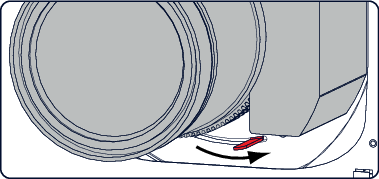
Image 4–13 Lock lens - Check if the lens is really secured by trying to pull the lens out of the lens holder.