
Lens adjustment buttons on the Remote Control
On the Remote Control four buttons with double action are provided, allowing direct alignment for lens ZOOM, FOCUS, HORIZONTAL SHIFT and VERTICAL SHIFT.
Press LENS ZOOM button [-] or [+] (A) for correct image size on the screen.
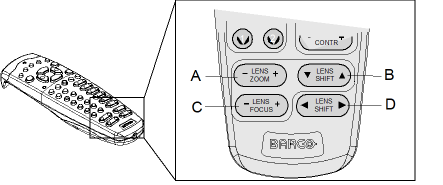
Image 7–6 Direct lens adjustment keys - A
- Zoom
- B
- Vertical shift
- C
- Focus
- D
- Horizontal shift
- Press LENS FOCUS button [-] or [+] (C) for an overall focus of the image.
- Press ▲ LENS SHIFT ▼ button for correct vertical position of the image on the screen.
- Press ◄ LENS SHIFT ► button for correct horizontal position of the image on the screen.