2.2 Unpacking the projector

What has to be done ?

Upon delivery, the projector is packed in a carton box upon a wooden pallet and secured with banding and fastening clips. Furthermore, to provide protection during transportation, the projector is surrounded with foam. Once the projector has arrived at the installation site, it needs to be removed from the carton box and wooden pallet in a safe manner without damaging the projector.

Note: After unpacking let the projector acclimatize to a room temperature higher then 10°C (50°F) and lower then 40°C (104°F). Neglecting this may result in a start up failure of the Light Processor Unit.
Required tools

cutter knife

How to unpack
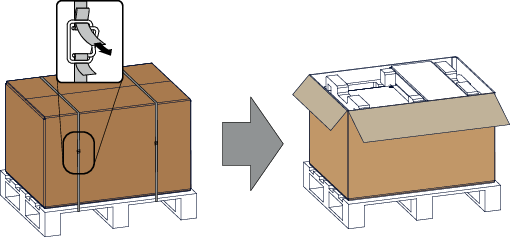
  1. Remove the banding around the carton box, by releasing the fastening clips as illustrated, and open the box.

    Image 2–1 Opening box
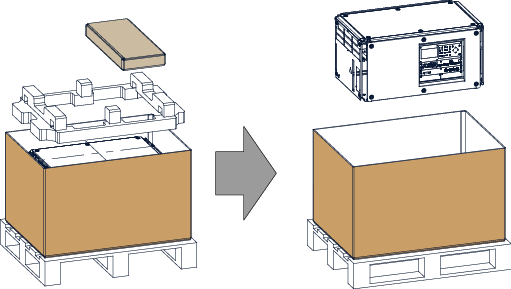
  2. Remove the small box on top of the projector. This box contains the accessories such as manuals, remote control, etc.

    Image 2–2 Remove carton and foam rubber
  3. Take out the foam rubber.
  4. Take out the projector.
Tip: Save the original shipping cardboard box and packing material. They will be necessary if you ever have to ship your projector. For maximum protection, repack your projector as it was originally packed at the factory.
Note: A rubber foam inside a plastic bag is placed into the lens opening of the projector. It's recommended to reuse this foam and plastic back each time you transport the projector. This to prevent intrusion of dust and foreign particles.
Note: The lens is delivered in a separate box.