Note: The mentioned menu items in the mode explanation will be explained in detail in the next topics.
Settings in the 3D menu are stored per input.
Single 3D channel - Full resolution - sequential mode
Content is displayed by one 3D source. The frames for the left eye and right eye are displayed alternately (sequential mode). Optional an external 3D sync can be used. The external 3D sync has to be applied to the “3D SYNC IN” port (BNC socket at the left) of the 3D Input Module.
If two 3D Input Modules are used:
In case a 3D Input Module is selected: use the SYNC IN of this 3D Input Module.
In case another (DVI, SDI, 5-cable, …) input module is selected: use the SYNC IN of the first (lowest input number) 3D Input Module.
If the external 3D sync is not available an internal 3D sync is generated by the projector. With the setting “Field dominance” the Sync In signal can be inverted to match the left and right eye fields.
MENU > Input > 3D > L/R Synchronisation > Field Dominance [L/R] or [R/L]
Example: A DisplayPort source with a frequency of 120 Hz consisting of content for the left and right eye results in a 60 Hz video per eye.
To activate the single channel 3D mode select:
MENU > Input > 3D > Frame Sequential – Single Channel
Possible sources: DisplayPort, HDMI, dual-link DVI, 5-cable analog (up to 210 MHz), DVI analog (up to 170 MHz), SDI (up to 150 MHz).
Note: With the “Invert 3D sync out” setting the content can be switched between the left and right eye of the user.
The “Field dominance” setting has only effect in the 3D mode: Frame sequential → Single channel (in all other modes this setting is grayed out). Furthermore, the input frequency must be equal or lower than 100 Hz (50 Hz per eye). In case the input frequency is higher than 100 Hz (50 Hz per eye, 59.94 & 60 Hz in practice), the “Field dominance” setting has no effect.
Single 3D channel - Full resolution - other formats
Contains Frame packing and Line Alternating (3G-B).
To activate the single channel 3D mode select:
MENU > Input > 3D > Frame packing (FHD3D)
or
MENU > Input > 3D > Line Alternating (3G-B) (only for SDI input)
Single 3D channel - Half resolution
3D content is distributed by one 3D source by means of “Side By Side”, “Top Bottom” or “SENSIO® Hi-Fi 3D”..
To activate this single channel 3D mode select one of the three options:
MENU > Input > 3D > Side-By-Side (Half)
MENU > Input > 3D > Top-and-Bottom (Half)
MENU > Input > 3D > SENSIO® 3D Decoder - FFC (only on 3D input)
Example: A 3D HDMI source with a Side by Side video of 60 Hz results in a 60 Hz video per eye.
In this mode the 3D Input Module also generates the 3D sync.
Possible sources: Display Port, HDMI, DVI , SDI input.
Dual 3D channel - Two parallel 3D content streams
3D content is applied to the projector via two input ports. One port is used for content of the left eye, the other port for the right eye.
Example: Two parallel DVI streams of 60 Hz: DVI cable 1 is connected with the DVI port of the projector. DVI cable 2 is connected via a HDMI converter cable with the HDMI port of the 3D Input Module. To switch the HDMI/DP input to HDMI, select
MENU > Input > Advanced Settings > HDMI/DP > HDMI.
For the second source the correct type has to be selected as follows with the first source already selected :
MENU > Input > 3D > Second Input > “select corresponding slot number”
The 3D Input Module is activated for Dual 3D channel:
MENU > Input > 3D > Frame Sequential – Dual channel
Possible sources: 2 x DVI , 2 x SDI. If two 3D Input Modules are installed: 2 x HDMI or 2 x DisplayPort.
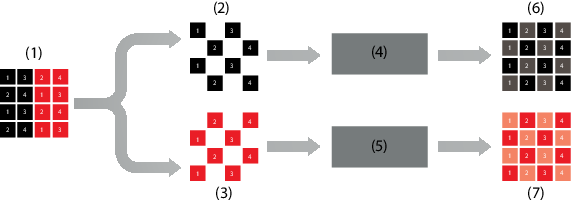
SENSIO® Hi-Fi 3D
Image 9–58SENSIO® HI-FI 3D decoding
1
SENSIO® Hi-Fi 3D stream
2
Left expansion
3
Right expansion
4
SENSIO® Hi-Fi 3D interpolation
5
SENSIO® Hi-Fi 3D interpolation
6
Right stream
7
Left stream
SENSIO® 3D Decoder - FFC is using both the SENSIO® 3D Decoder as well as the SENSIO® Autodetect functionality. This mode enables an automatic detection of 2D, Top-and-Bottom, Side-by-Side and the SENSIO® Hi-Fi 3D format, with a clean transition and fast detection time between these formats. Only progressive formats are supported. Interlaced formats will be displayed in 2D (one eye only). The SENSIO® Autodetect feature requires a minimum of 1120x540 active pixels per field/frame to operate.
The acronym FFC stands for ‘Full Frame Compatible’, in other words, the decoder handles all full frame based 3D formats.
Double or triple flash
Double or triple flash is used for 3D sources to avoid flickering images.
Input frequency < 40Hz/eye → triple flash will be used and results in:
144Hz for 24Hz/eye input
150Hz for 25Hz/eye input
180Hz for 30Hz/eye input
Input frequency between 40Hz and 51Hz/eye → double flash will be used and results in:
[2] 2x HDMI and 2x DP requires 2 3D input modules. 2xDVI can be done with a DVI input and a 3D input with DVI to HDMI convertor
[3] For 2xSDI, IN1 and IN2 of the SDI input can be used. The input settings under MENU -> Input -> Advanced Settings -> SDI/HDSDI/3G must be set to ‘DUAL SDI’
[4] For SDI (3G- Level B), IN1 or IN2 of the SDI input can be used. The input settings under MENU -> Input -> Advanced Settings -> SDI/HDSDI/3G must be set to ‘Input 1’ or ‘Input 2’, with or without Priority