
Overview
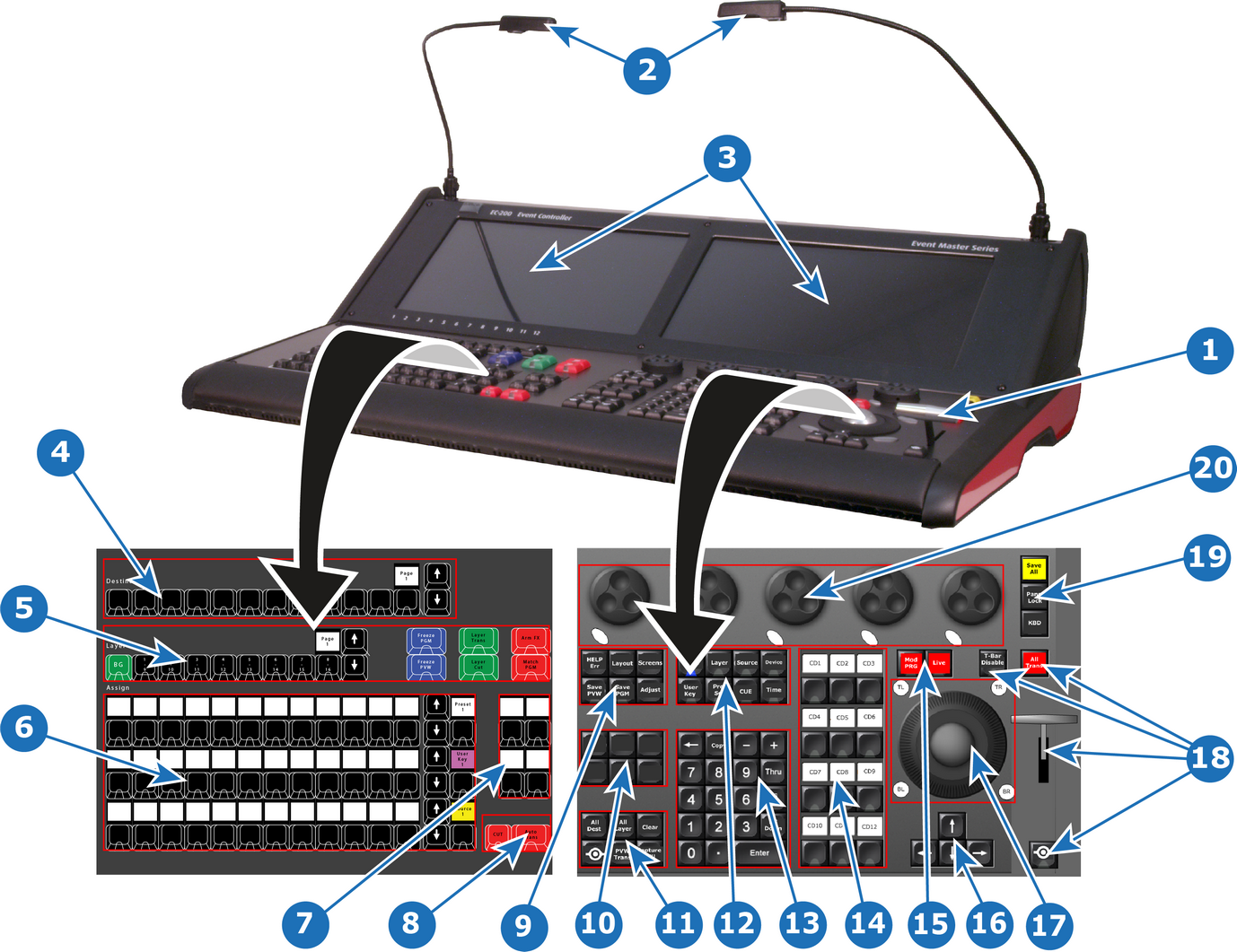
| 1 | T-bar | 11 | Direct selection button group |
| 2 | Script light (flexible support) | 12 | Syntax entry button group |
| 3 | Touchscreen | 13 | Numpad |
| 4 | 12 Destination buttons and a display showing the current page of Destinations | 14 | Contextual display button group |
| 5 | Layer buttons and a display showing the current page of Layers | 15 | Live function button group |
| 6 | Assign buttons in three identical rows that can host multiple selections and a contextual display showing page of the Assign button row | 16 | Arrow button group |
| 7 | User-assignable function buttons, with their label displays | 17 | Trackball with 4 modifier buttons |
| 8 | Cut and All Trans buttons | 18 | T-bar with Disable button, All Trans, and Barco Eye function button |
| 9 | System function button group | 19 | On-screen keyboard button, console lock button, Save All button |
| 10 | Future expansion button group* | 20 | Rotary encoders, referred to as wheels, with modifier buttons |
* On the EC-210 the future expansion button group features the “Play/Pause” and “Stop” CUE buttons.