General
The Cue menu is the module used to create Cues and to add Presets, External Device commands, and UI functions such as All Trans and Cut to those Cues. The Cue menu also allows the user to play, pause, or stop a Cue.

The Cue menu is the module used to create Cues and to add Presets, External Device commands, and UI functions such as All Trans and Cut to those Cues. The Cue menu also allows the user to play, pause, or stop a Cue.
The Cue menu has four main areas, each of which contains information or controls.
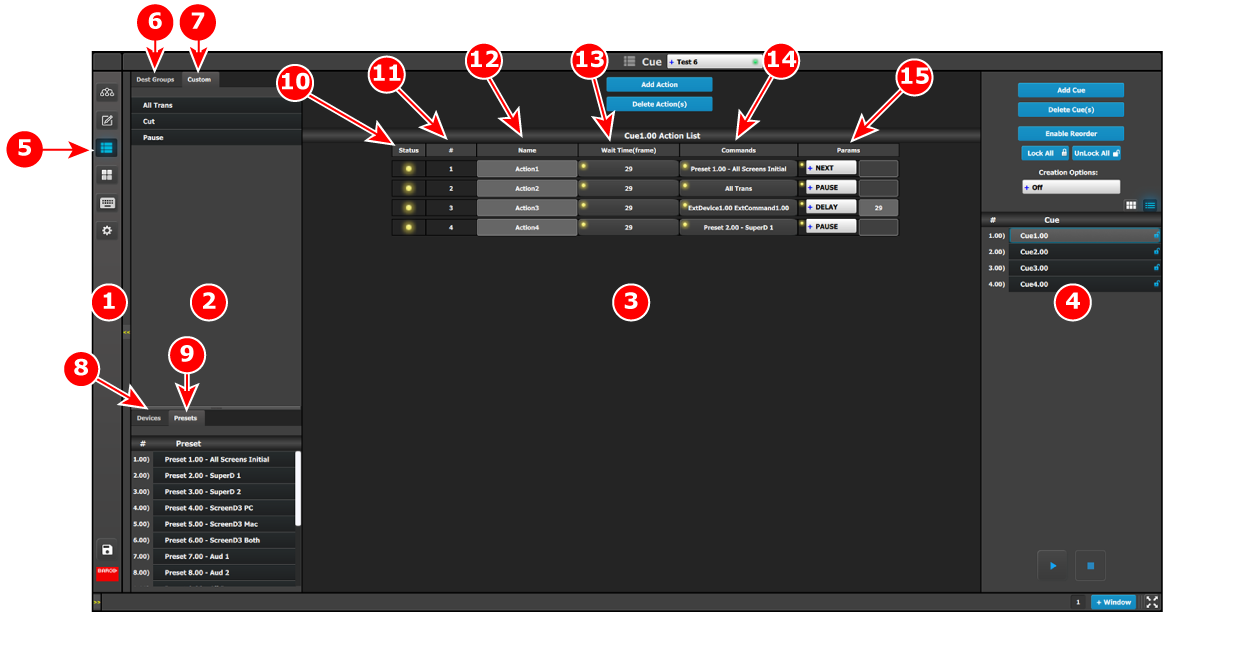
Adjustment area—The adjustment area allows the user to add, delete, lock, unlock, and rename Cues. The adjustment area also allows the user to play, pause, or stop a Cue.
 /
/  (Play / Pause) and
  (Stop) buttons.
Status—The Status LED indicates the status of the cues in a cue list.