6.43 Multiviewer Menu > Adjustment area > Window adjustment

General

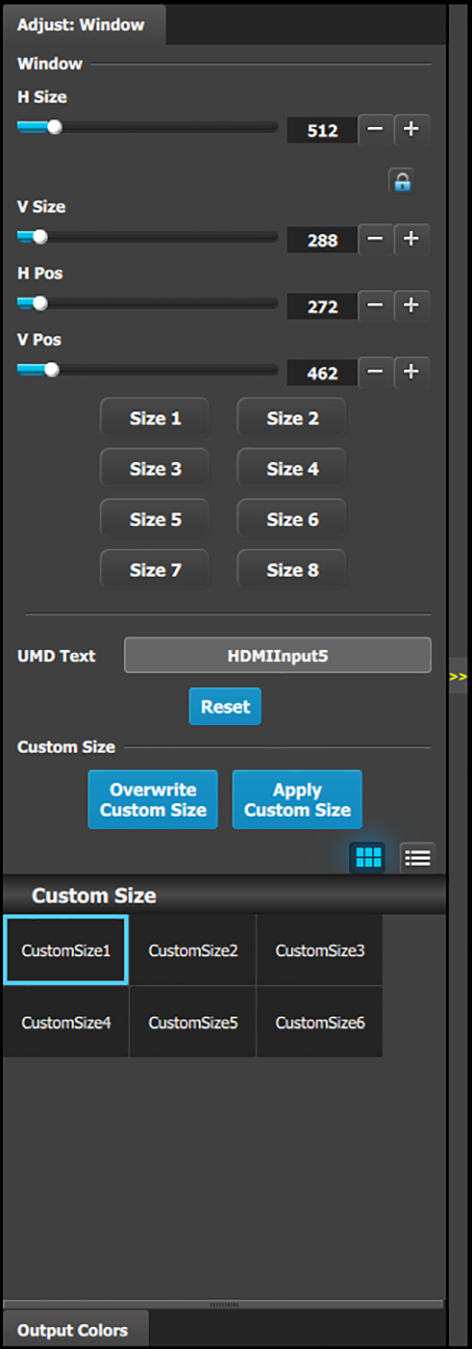
In this section, the user can resize and position the selected window. A multiple window selection is available.

Description

The following functions are provided:

  • H Size(pixel): Adjusts the window’s horizontal size in pixels.

    Note: The Lock icon indicates that the H Size and the V Size values are locked together in an aspect ratio. Adjusting one value adjusts the other.

  • V Size(pixel): Adjusts the window’s vertical size in pixels.
  • H Pos(pixel): Adjusts the window’s horizontal position in pixels.
  • V Pos(pixel): Adjusts the window’s vertical position in pixels.
  • Automatic preset: The eight size buttons are shortcuts to different sizes depending on how many of these windows can fit horizontally. Vertically the window is adjusted to match the aspect ratio.

    For example:

    • Size 1: The window is adjusted to fit the full horizontal space.
    • Size 2: The window is adjusted to half the horizontal space.
    • ...
    • Size 8: The window is adjusted to an eighth of the horizontal space.
  • Reset button would reset the UMD text to the configured name of the resource.
  • Custom Size: The operator can select one of six (6) custom sizes and either apply the chosen custom size to the current window, or overwrite the custom size with the currently selected parameters.