Overview
These buttons are present only on the large controllers (EC-200 and EC-210).
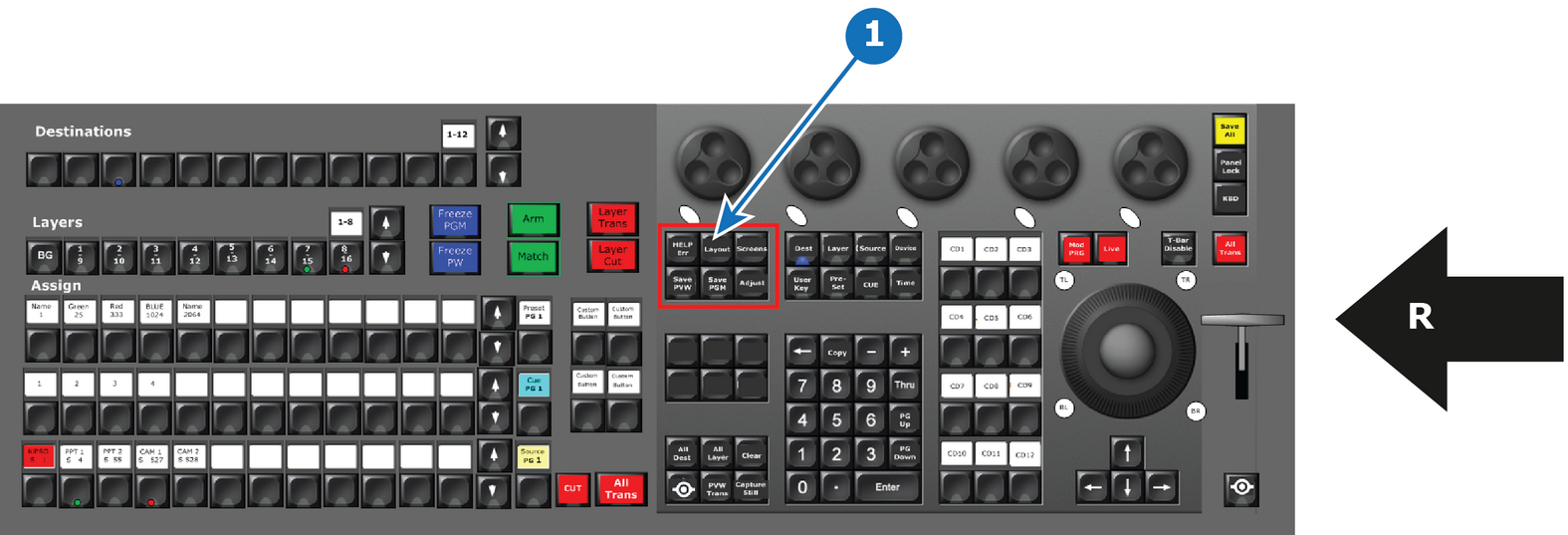
- 1
- System function Button Group
- R
- Right Side of the Controller

These buttons are present only on the large controllers (EC-200 and EC-210).
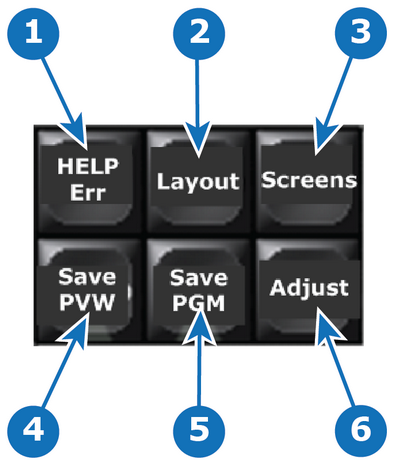
| Button Name | Description | |
| 1 | HELP Err | This button has currently no function. |
| 2 | Layout | The Layout Function Button allows for recalling layouts where applicable like Multiviewer, Programming menu, and controller (Assign side) benefit from this function. |
| 3 | Screens | This is the function to change the active page of the GUI to the touchscreens and the HDMI output (EC-210). |
| 4 | Save PVW (Save Preview) | Latches and lights a RED LED and activates a Store/Record Mode with applicable functions from Preview. The Save PVW of the GUI will be RED as long this mode is active. |
| 5 | Save PGM (Save Program) | Latches and activates a Store/Record Mode with applicable functions from Preview. The Save PGM of the GUI will be RED as long this mode is active. |
| 6 | Adjust | Pressing the Adjust Button opens the Adjust tab on the active touchscreen. |