11.2 EC-30 controller connection

Prerequisites

Event Master Toolset revision 4.2 or higher must be installed on the Host computer prior to the connection of the EC-30.

Note: Verify that the Host computer is equipped with the latest software version available on the Barco web site (URL:https://www.barco.com/). Refer to the chapters “Download of Event Master Toolset Software” and “Software installation” for more information on the software downloading and how install it on the Host computer.
Connection diagram
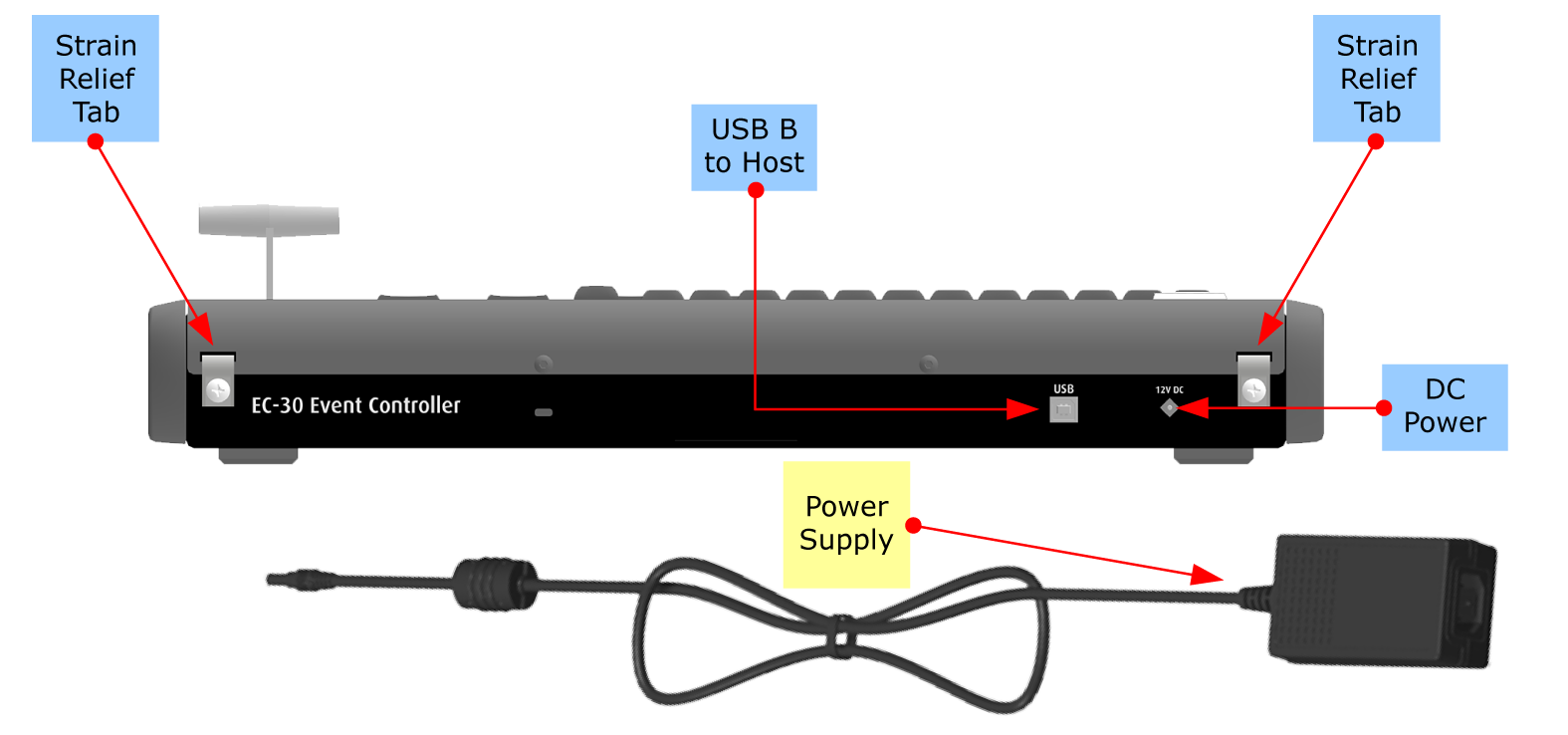
Image 11–1 EC-30 connections
Description
  1. Connect the Host computer to the USB B connector on the EC-30. Necessary cables are provided in a new system. In the case that the original cables are missing, simply use standard computer cabling to make these connections.
  2. Connect AC power to the power supply, and connect the power supply to the DC power receptacle on the rear panel of the unit.

    Running the power-supply cable through one of the strain-relief tabs on the rear of the unit can help to keep the cable from pulling out of the DC power receptacle. Loosen the screw on a relief tab; run the power-supply cable through the tab; tighten the screw.

    You can consume extra cable length, if necessary, by passing the cable through both tabs.

  3. Power up the EC-30 control panel, Host computer, and peripherals.
Note: During the Event Master Toolset installation you are asked to add a driver, be sure to answer yes to this question in order to use the EC-30 with your host computer. If the driver is not installed the EC-30 will not work.