Overview
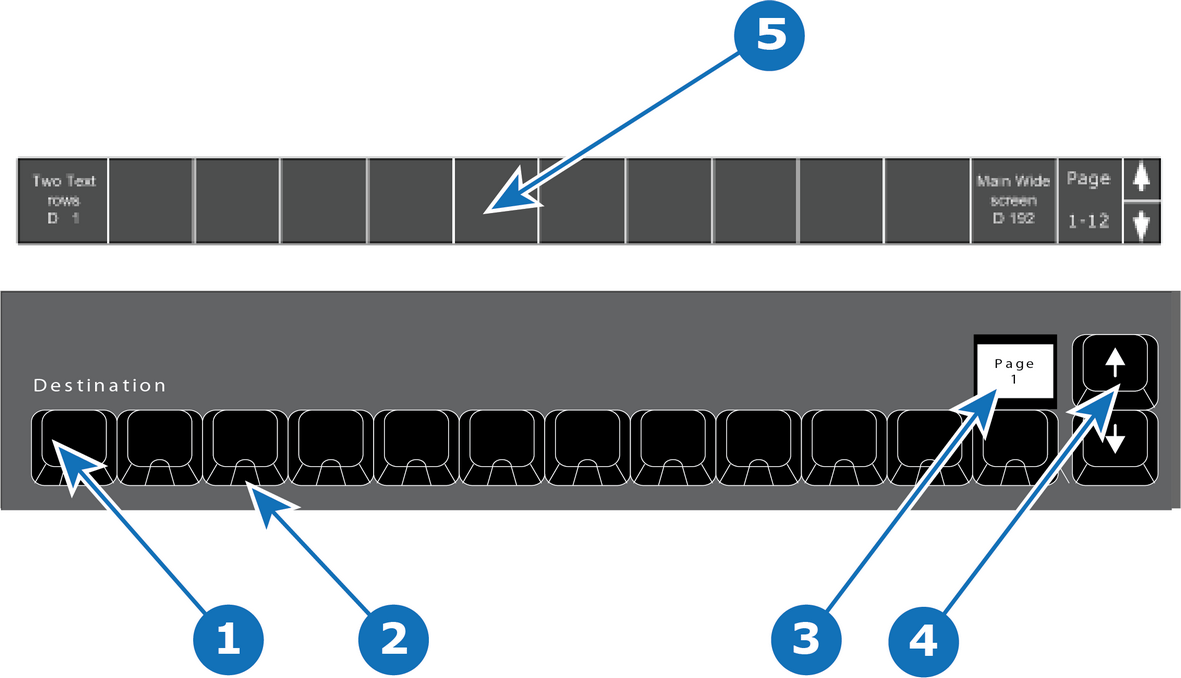
- 1
- 12 destinations buttons.
- 2
- Blue LED.
- 3
- Current page display.
- 4
- Arrow buttons (Page change: up and down).
- 5
- Names of destinations displayed at the bottom of the screen.

The 12 destinations buttons have several pages which allows an operator to define custom orders and layouts of mapped Destinations.
The name of the destination is displayed at the bottom of the GUI on the touchscreen. It can be shown or hidden on preference.
The Display above button 12 will show the current page (1 – 8) of Destinations. Use the Arrow (up and down) to change the page.
LED color under the Destinations buttons are BLUE. This indicates the Destination is selected when lit.