Overview
These buttons are present only on the large controllers (EC-200 and EC-210).
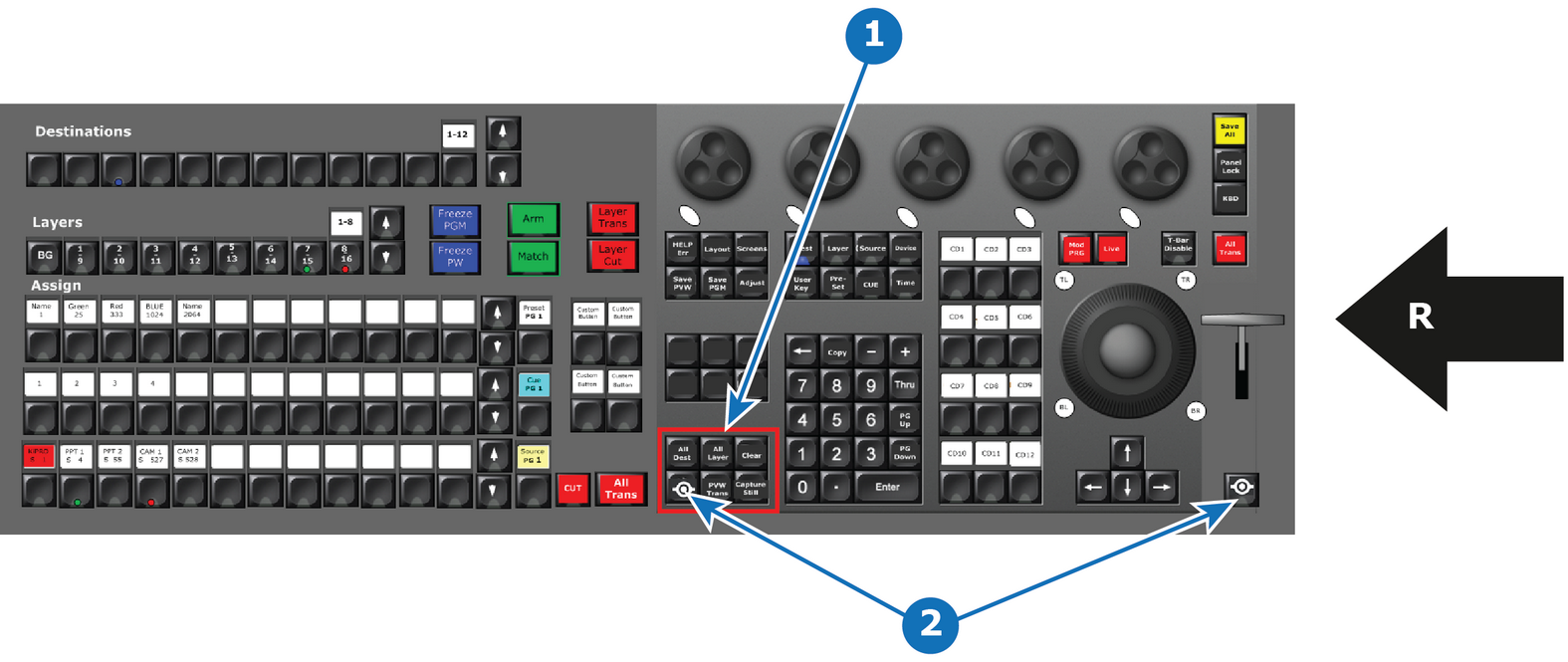
- 1
- Selection Button Group
- 2
- Barco Eye button (2x)
- R
- Right Side of the Controller

These buttons are present only on the large controllers (EC-200 and EC-210).
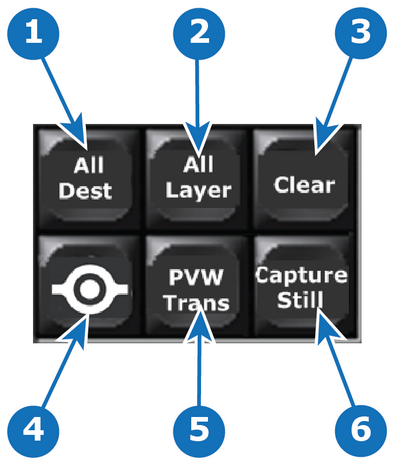
| Button Name | Description | |
| 1 | All Dest | Selects all Destinations for further actions or with Press and Hold have extended function. |
| 2 | All Layer | Selects all Layers in selected Destination(s) for further actions or with Press and Hold have extended function. |
| 3 | Clear | The CLEAR button has the same function as the Clear button on the EMTS Programming menu. Extended functionality is reached with Press and Hold, along with pressing other buttons. |
| 4 | Barco Eye | Modifier Button, like Windows/CTRL/Fn button on a keyboard. Further described in functionality around other buttons. Note: Both Barco Eye buttons (one on either side of the console) have the same function. |
| 5 | PVW Trans | The PVW Trans button is used to preview a PIP move, without having to transition it to Program. |
| 6 | Capture Still | The Capture Still Button is used in Syntax entry to record Still Stores from the Inputs. |