Overview
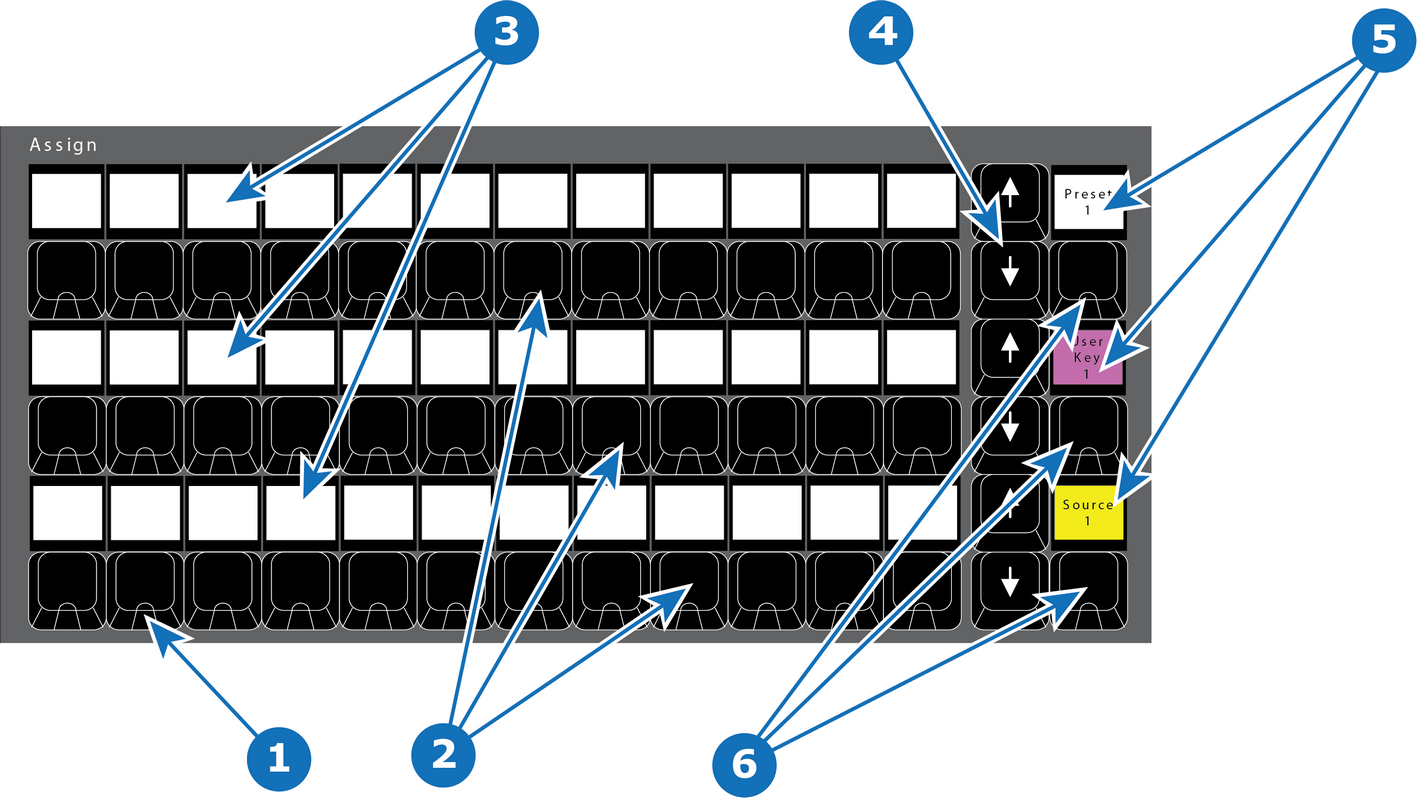
- 1
- LED (Red or Green).
- 2
- Three rows of 12 Assign buttons
- 3
- Three rows of 12 displays
- 4
- Three rows of 2 Arrow buttons (up and down).
- 5
- Three bus-type displays
- 6
- Three bus-type buttons

The three rows of 12 buttons, each with a dedicated display can be assigned with several types of functions including Backgrounds, Source Files, Presets and User Keys.
Each row also has Up and Down arrow buttons which are used to switch between pages per row.
An additional button to the right of the arrow buttons on that row is called BUS TYPE. It has a display above it. The button toggles among bus types with the display above showing a color that indicates the currently selected Assign bus type.
LEDs under the Assign buttons are either RED or GREEN:
| LED color | Description |
| Red | for On PGM |
| Green | for On PVW |
Backlight color assign per function (for an entire row) :
| Function | Color |
| Source | Yellow backlight |
| User Key | Magenta backlight |
| Background Source | Green backlight |
| Preset | White backlight |
| Cue | Cyan backlight |