The Quad Combo Input Mk II support 12G input and throughput on the SDI connectors.
Compared with the Mk I the Mk II includes the following:
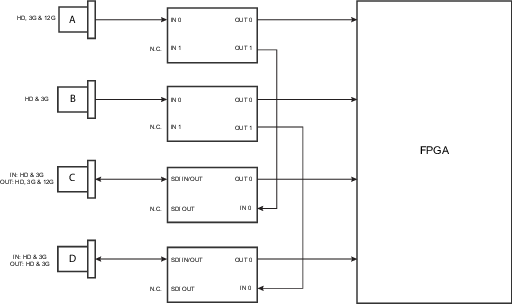
SDI input A supports 12G input signals.
SDI input C functions as a loop-through output for any signal placed on input A.
SDI input D functions as a loop-through output for any signal placed on input B.
HDBaseT input 1 supports network connectivity.
Caution: Ethernet should only be connected to either the 10/100 base-T port (on the communication panel) or the HDBaseT input (on the Quad Combo Input). Using both at the same time will lead to undefined behavior.
SDI input & output – How does it work?
When connecting an SDI source to the projector and the signal is HD or 3G, you can choose any of the four input connectors.
When connecting multiple projectors with the same signal, you can connect the signal as follows:
Connect the source signal to Input A or B of the first projector.
If the source signal is connected to input A, connect input/output C to the Input of the following projector.
If the source signal is connected to input B, connect input/output D to the Input of the following projector.
Continue in the same fashion until all projectors are connected.
When connecting a 12G SDI source to the projector, you can only connect that source to input A.
Note: Only Input A accepts 12G SDI signals . While it is technically possible to connect a 12G SDI source to Input B and connect that source to another projector in line (using Input/Output D), this first projector itself will not be able to process the 12G signal.
Image 8–4
LED behavior
The SEL LED lights up GREEN: input is selected.
The SEL LED blinks GREEN: input/output is selected and configured as output.
The SYNC LED lights up ORANGE: valid input sync is detected.
The SYNC LED blinks ORANGE: Sync/signal is present, but not conform with input port standard.
Note: Non-conformity issues can be caused by older or low quality cables unable to handle the requested resolution, or connected signal converters manipulating the signal out of the supported video standards.
Note: For specifications about the supported inputs for SDI, HDMI, HDBaseT and DisplayPort 1.2 see chapter “Specifications”.