5.3 Pulse RCU, protocol setup

Note: Pulse Remote Control Units produced from April 2023 onwards will only support the NEC protocol. There will no longer be a switch in the battery compartment to select the legacy RC5 protocol.
About the used protocol

The protocol is the code send out by the remote control when a button is pressed. Depending on this code, the projector can decode the signals. The remote control can be used with two different protocols: RC5 and NEC. Depending on the projector, the remote control can be switched between these protocols.
Which protocol to use
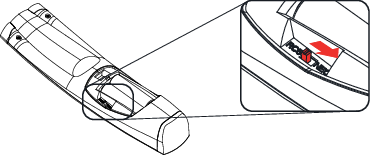
How to set
  1. Remove the cover. For more info on how to remove, see “Pulse RCU battery installation”.
  2. Place the switch in the desired position.

    Image 5–6
Remarks when using the RC5 protocol

Due to new or updated functionality not all buttons of the Pulse RCU are one-to-one compatible with the legacy Barco RCU and projectors. Take the following limitations into account: