Buttons overview
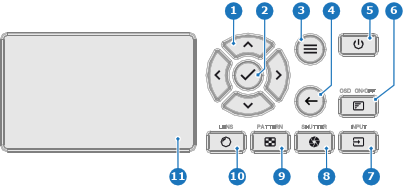
- 1
- Menu navigation
- 2
- Menu confirmation, OK button
- 3
- Menu open / close
- 4
- Menu back
- 5
- Power on / off
- 6
- Projector OSD on / off
- 7
- Input selection
- 8
- Shutter open / close
- 9
- Test patterns
- 10
- Lens adjustment
- 11
- LCD panel

The Keypad gives direct access to several functions, in addition, access to the menu system.
The keypad has a backlight that can be switched on and off manually. By default the light turns off after 5 minutes.
The Power and Shutter buttons are equipped with white, blue and red backlit LEDs. The other keys are only equipped with white and blue backlit LEDs. The LEDs are controlled according to the features available.
The LCD panel has two main functions, and use the arrow keys to navigate in the LCD display:
Information regarding the status of the projector showing this data:
Toggle between the two indications by using the Menu button on the keypad, or on the remote control.
The LCD Display will fade out 30 seconds after the last key operation.