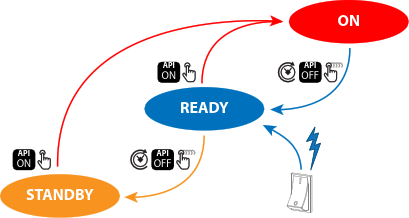
| Short pressing the Power on/off button on the local keypad or on the remote control unit. |
 | Long pressing the Power on/off button on the local keypad or on the remote control unit. |
  | API command to change the power state of the projector (Power ON, Power OFF).See Pulse user guide for more info (E.g. PJLink). |
 | Auto light source off and auto standby features. Default disabled (factory settings). For configuration see power saving settings in the Pulse user guide. |
 | The projector starts default up in READY mode when switching on the power of the projector. |