About shifting
It is possible to shift the whole image. This is considered as an equal movement of the 4 corner points in 2 x 2 mode. After shifting the image parts of the image might not be visible anymore.

It is possible to shift the whole image. This is considered as an equal movement of the 4 corner points in 2 x 2 mode. After shifting the image parts of the image might not be visible anymore.
Select full image as Warp area (1).
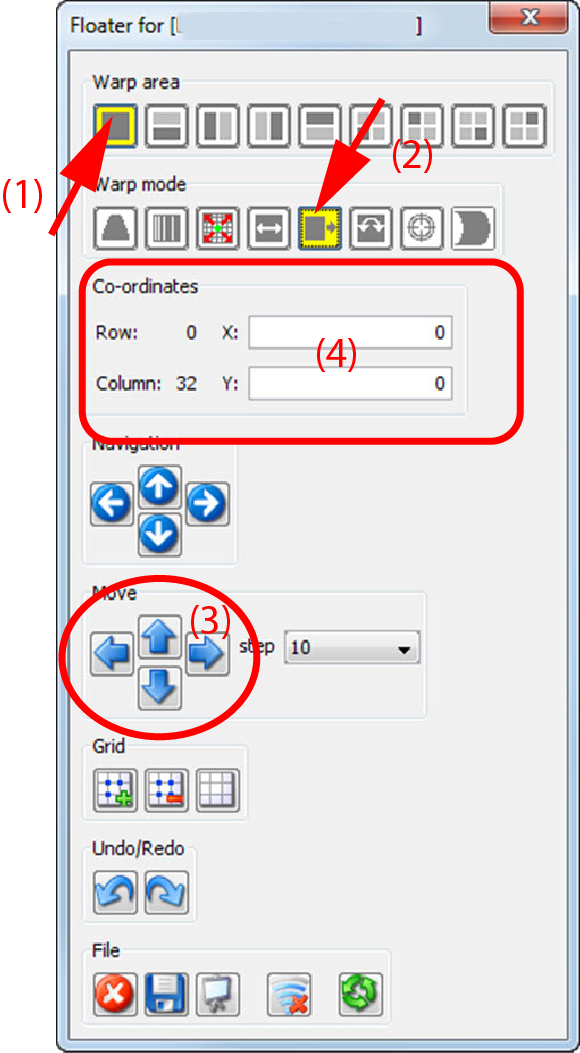
Select as warp mode Shift (2).
The 4 corner nodes are selected.
Click on a corner node and drag to the desired position
click in the pane on the left ore right arrow key until the image is on the desired horizontal position and on the up or down key for the vertical position (3).
To fine tune this adjustment, select a specific area and add extra anchor points by changing the warp level.
enter in the pane the X and Y movement of the image (4).