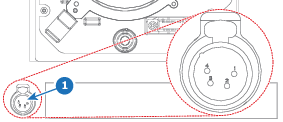
There is a 4-pin XLR connector located on the front side of the UDX and UDM projector, underneath the lens holder.
Image 14–11Location of the XLR connector
The front XLR connector can be used to connect with peripheral devices. These can range from the motorized rigging frame, an external mechanical shutter or other XLR-powered devices.
Caution: multiple peripheral devices can be connected if an XLR splitter is available. However, take into account that the maximum allowed load on the front XLR connector is 2 A.
Pinout of the front XLR connector
4-pin XLR connector
Pin
Description
1
Earth
2
Data-
3
Data+
4
VCC
What can be done
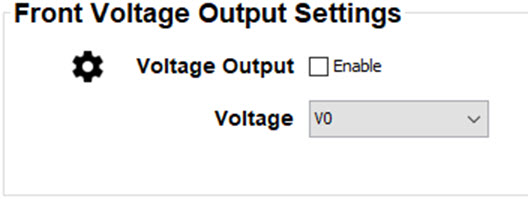
The front XLR connector is disabled by default and can be enabled using the Front Voltage Output Settings pane.
When enabled, the output voltage level can be set to 0 V, 12 V or 24 V.
The output voltage will depend on the application or peripheral used. For example, the optional external mechanical shutter requires 12 V. The motorized rigging frame on the other end requires 24 V.
How to set
Enable the output voltage. Check the check box next to Voltage Output.
Image 14–12
Click on the drop down and select the desired output voltage.
Note: Due to technical reasons, if the motorized rigging frame is connected to the XLR connector, it is mandatory to put the voltage to 24V.