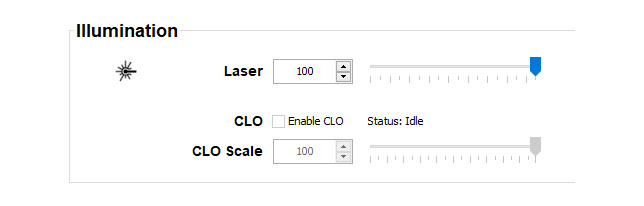
Within a certain power mode, the light output of the illumination source can be reduced by reducing the illumination power.
Alternatively, you can enable CLO mode (Constant Light Output), by selecting Enable CLO. Doing so can ensure a constant light output over a longer period.
Image 7–12Installation, Illumination
About CLO mode
All light sources naturally decrease their intensity over time. In order to prevent a decreasing output in a multi-projector setup, you can activate CLO mode to make sure that the light output remains constant.
CLO mode will ensure that the projector regulates its illumination power to maintain the same level of output light during the lifetime of the light source. This requires that the light source power is not set to 100% from the start, but to a lower value. The lower this value is set, the longer the projector will be able to maintain the output level.
Note: CLO mode can not be used when the light source is off, the shutter is closed or if the dynamic black feature is enabled and active (if applicable).
How to reduce the power manually
Make sure the that CLO is not enabled. Uncheck the checkbox next to CLO.
With an enabled CLO, the power output cannot be adjusted.
Click on the up down control of the spin box next to Laser until the desired output power is reached.
or
click in the input field, select the current value and enter a new value with the keyboard.
or
click and drag the slider until the desired value is reached.