13.2.2 Grid on screen

About enabling/disabling grid

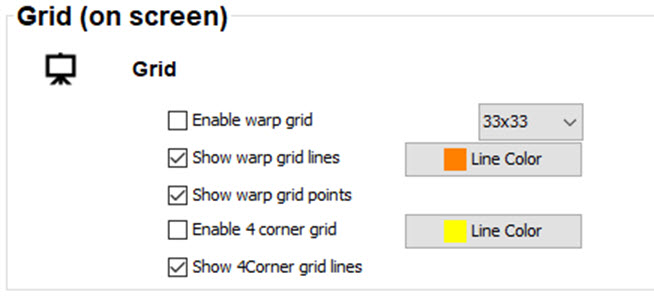
A grid or grid lines can be displayed on the screen to make the adjustment more easy. The density of the grid can be set.

The following grid or grid lines can be selected:

Image 13–3 Grid setup
How to select
  1. Check the check box in front of a grid function to enable that grid.
Grid density
  1. Click on the drop down box and select the desired density.

    The following selection is possible:

    • 2x2
    • 3x3
    • 5x5
    • 9x9
    • 17x17
    • 33x33

    Start with a low density and increase the density to fine tune the adjustment

Grid line colors

The grid line colors can be changed to any color using on the the following ways:

For more info how to change the color, see “Grid on screen”.