13.3.11 Linearity mode

About linearity

Linearity makes it possible to equalize the space between vertical lines. Only the points inside a selected area will move while adjusting the linearity. The points at the outside of the image move gradually more that those at the inside.
Adjusting vertical and horizontal linearity
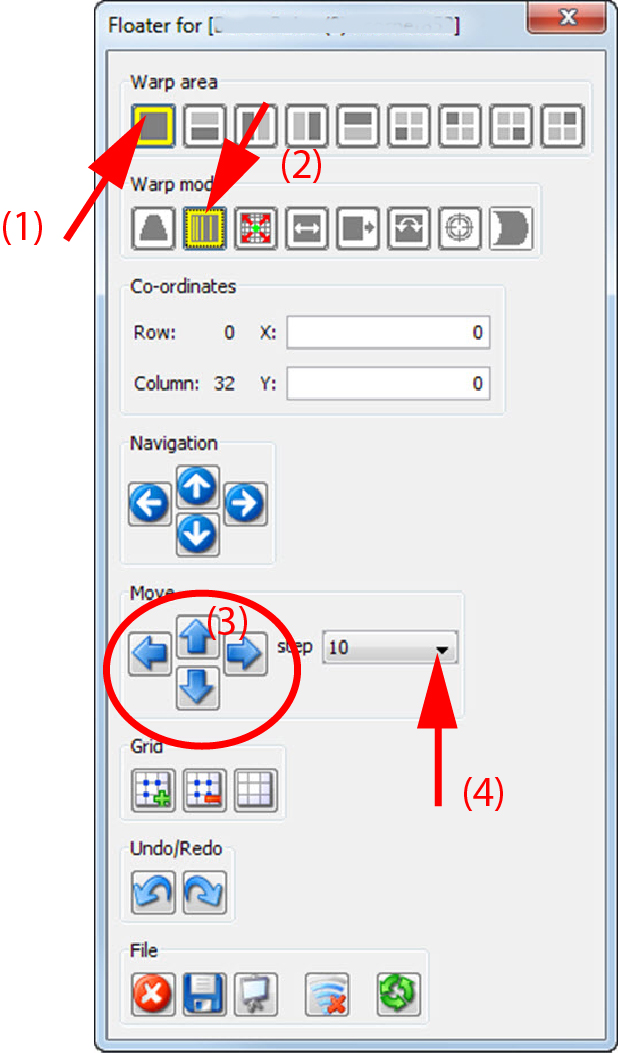
  1. Select with the grid buttons of the Floater menu until only the corner nodes are selectable (1).

    Image 13–37 Linearity
  2. Select the desired warp area

    Depending on the selected area only the points in that area will be adjusted.

  3. Select as warp mode Linearity (2).
  4. Click on the node and drag to the desired position

    or

    select the node and click on the move buttons to move the node horizontal or vertical (3).

    To fine tune this adjustment, select a specific area and add extra anchor points by changing the warp level (4).