23.9 P7 Calibration

About P7 calibration

The native P7 coordinates of a projector are factory measured and stored in the projector. When due to a service action, maybe some parts in the full light path are changed, than it is possible that the native coordinates are not correct anymore with result that the real color functionality will not work correctly.

A service technician can unlock the current set of native coordinates and re-measure these coordinates one by one using a chromameter.
Required tools

Chromameter

How update
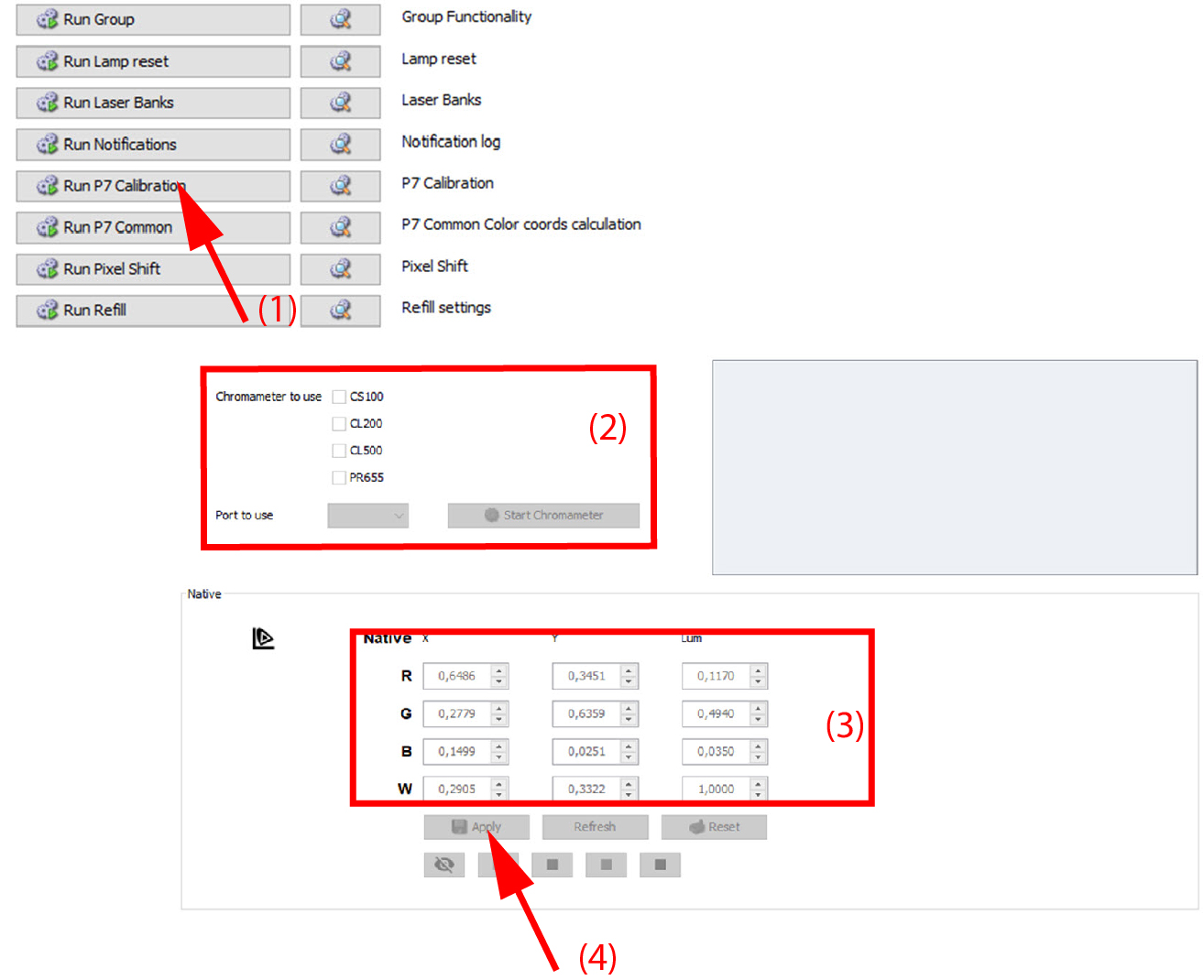
  1. Click on Run P7 calibration (1).

    Image 23–18

    The P7 calibration menu is displayed.

  2. Select the type of chromameter you will use. Fill out the port and click Start Chromameter.
  3. Switch on a white test pattern and measure the color coordinates. Enter the measured value in the matrix.

    Note: Switching on a P7 test pattern can take a few second.
  4. Continue with red, green and blue.
  5. Clear the test pattern.
  6. Click Apply.

    Note: To return to the factory measured coordinates, click on Reset before clicking apply.

    The new measured coordinates are stored in the projector and will be used as the native color coordinates of this projector.