14.10 LCD/Keypad

What lighting can be controlled

The backlight of the LCD panel can be turned off or can be turned off automatically after a certain time.

Alternatively, you can turn on Stealth Mode instead. By activating this mode, both the backlight of the LCD as well as the backlight of all the buttons of the keypad will be permanently disabled.
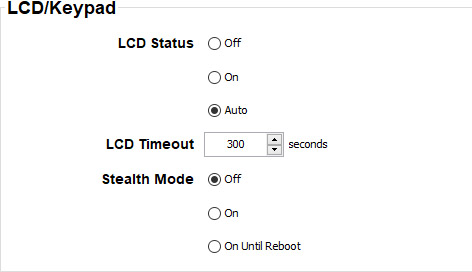
Image 14–14 LCD backlight
How to control
  1. While the Communication tab is selected go to LCD/Keypad pane and select the radio button of your choice.

    • Off: backlight is continuously off
    • On: backlight is continuously on
    • Auto: backlight is switched off after a certain time
  2. To set a timeout, click on the up down control until the desired time is reached

    or

    click in the input field, select the current time and enter a time with your keyboard.

  3. To use the stealth mode, select the radio button of your choice the check box next to Stealth Mode:

    • Off: Stealth mode is continuously off
    • On: Stealth mode is continuously on
    • On until reboot: Stealth mode will be on until the projector is turned off or is rebooted.