9.2 Output setup

Note: Output setup can only be done on models with an actuator included. For all others, the default output resolution is displayed and the selection is disabled.
How to set
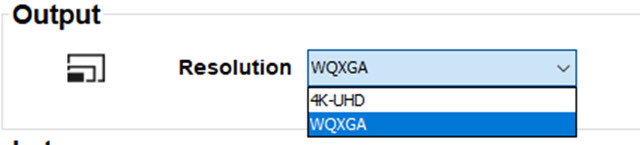
  1. While in the I/O tab, go to the Output pane.

    Image 9–2
  2. Click on the drop down control and select the desired output resolution.

    The possible depends on the projector types. E.g.:

    • 4K UHD: 4k images, using the actuator at normal frequency.
    • 4K UHD S: 4k extra sharp images, using the actuator at a higher frequency
    • WQXGA: 2k images. In this mode, the actuator is disabled.
Tip: If the main purpose of the projection is image (pictures, movie, or similar purpose), use the 4K UHD output resolution for the best image at the highest light output.

If the main purpose of the projection is text (spreadsheets, presentations, or similar purposes), use the 4K UHD S output resolution for the for the most stable and sharpest output.