7.5 Digital Zoom/Shift

What can be done?

The image can be optically shifted by using the vertical and horizontal lens shift.

If you want to reach a lens shift beyond what is possible with the optical shift, you can also perform a digital lens shift. This digital shift will occur on the DMD, rather than the lens holder. So take into account that this additional shift is minimal and restricted to the limits of the chip used.

For the optical zoom and lens shift, use the function in the Lens pane.

Note: Lens shift is only possible when the used lens has been fully calibrated.
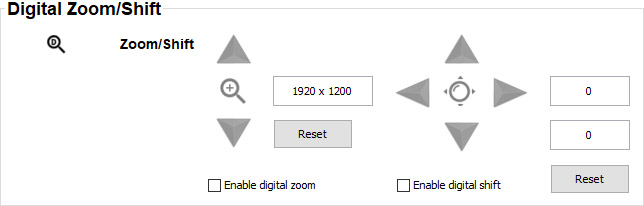
Image 7–8
Digital Zoom
  1. Select the check box before Enable digital zoom to enable this function.
  2. Use the up and down button to zoom in or out.

    The image dimensions of the zoomed image are given in the data field next to the zoom buttons

    Reset button brings the digital Zoom values back to the default position.

Digital Shift
  1. Select the check box before Enable digital shift to enable this function.
  2. Use the left and right button to shift the image in a horizontal direction.

    Use the up and down button to shift the image in a vertical direction.

    The number of digital shift is indicated in both data fields. The upper field indicates the vertical shift, the lower one indicates the horizontal shift.

    Reset button brings the digital shift values back to the 0 position.