13.3.7 Warp adaptation steps

Moving the cursor

Each click on one of the move icons corresponds with one step. The value for a step can be set.

When a big movement must be realized, first start with high value for the step. Adjust until you are in the neighbor and then reduce the value to continue adjusting until the goal is reached.
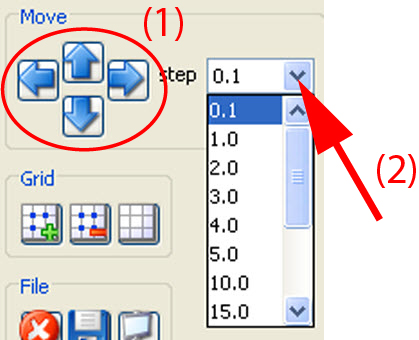
How to change the step value
  1. Click on the drop down box next to step and select the desired value (2).

    Image 13–30

    The following values are possible: 0.1, 1, 2, 3, 4, 5, 10, 15, 20, 25, 50, 100, 200.

  2. To make an adjustment, click on the up, down, left or right arrow key below Move (1).