Overview
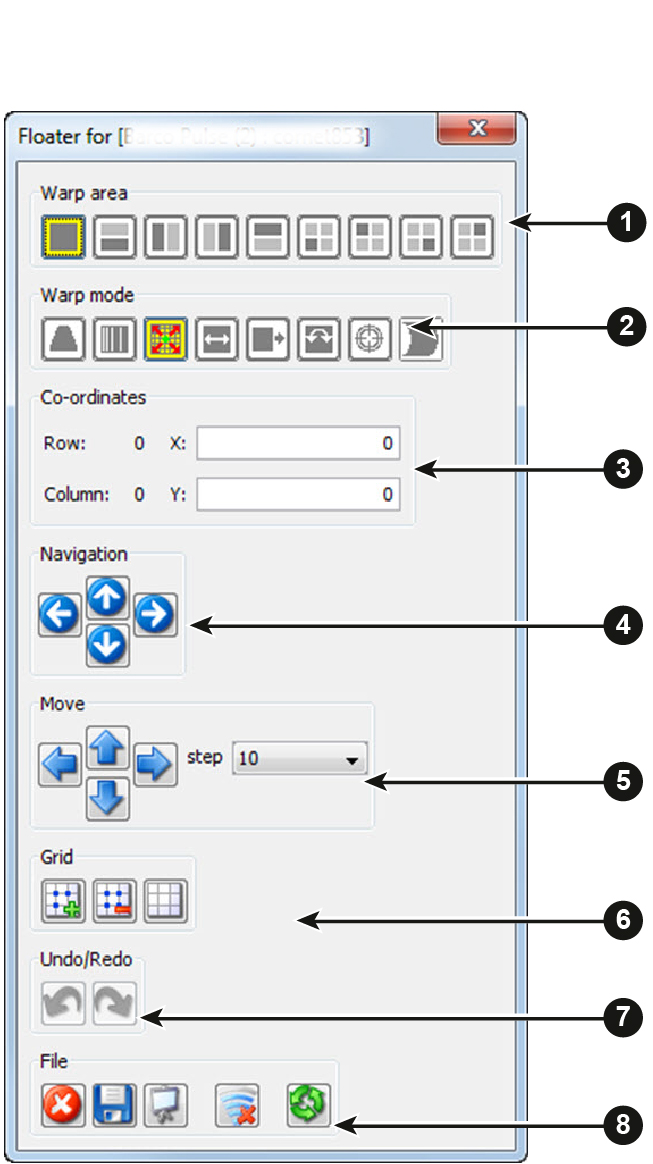
| 1 | Warp area |
| 2 | Warp mode |
| 3 | Coordinates |
| 4 | Navigator |
| 5 | Move and step control |
| 6 | Grid selection (level selection) |
| 7 | Undo/Redo last action |
| 8 | File, view control and reset |

| 1 | Warp area |
| 2 | Warp mode |
| 3 | Coordinates |
| 4 | Navigator |
| 5 | Move and step control |
| 6 | Grid selection (level selection) |
| 7 | Undo/Redo last action |
| 8 | File, view control and reset |
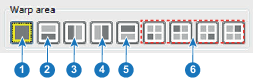
| 1 | Full screen |
| 2 | Bottom side |
| 3 | Left side |
| 4 | Right side |
| 5 | Top side |
| 6 | 4 quadrants |
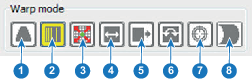
| 1 | Keystone |
| 2 | Linearity |
| 3 | Points |
| 4 | Scale |
| 5 | Shift |
| 6 | Rotation |
| 7 | Axis position mode |
| 8 | Bow HV mode |