Overview
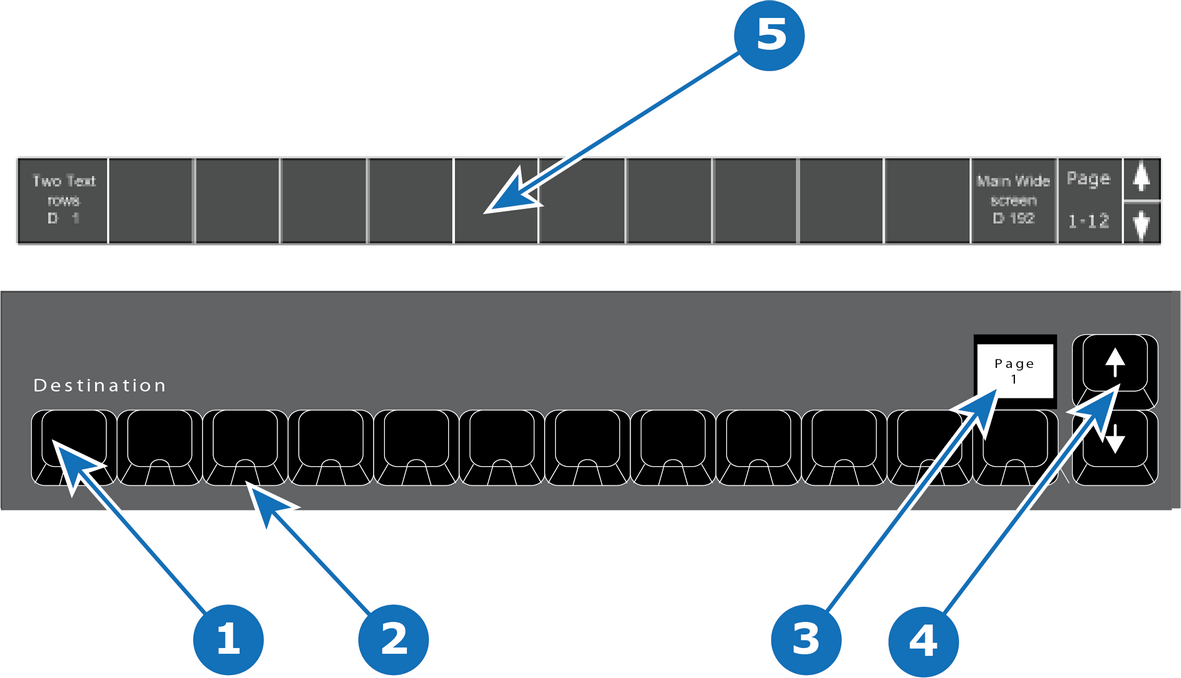
- 1
- 12 destinations buttons.
- 2
- Blue LED.
- 3
- Contextual Display (show the range of buttons — e.g. 1–12).
- 4
- Arrow buttons (up and down).
- 5
- Names of destinations written in the bottom of the screen.

The 12 destinations buttons have several pages which allows an operator to define custom orders and layouts of mapped Destinations.
The name of the destination is written in the bottom of the console menu page. It can be shown or hidden on preference.
The Contextual Display above button 12 will show the range of buttons 1 – 12, 13 – 24 etc. Use the Arrow (up and down) to change the range.
LED color under the Destinations buttons are BLUE. This indicates the Destination is selected when lit.