4.3 Dual link DVI input card

General

The dual link DVI input card includes two DVI-I dual-link connectors that can support a single or dual-link DVI video signal.

Note: Although the DVI-I connectors includes pins that support analog signals, the DVI card doesn't support analog signals. If you need to connect an analog signal to the unit, you need to employ an external A/D converter.

The figure below illustrates the dual link DVI input card's rear panel connectors:
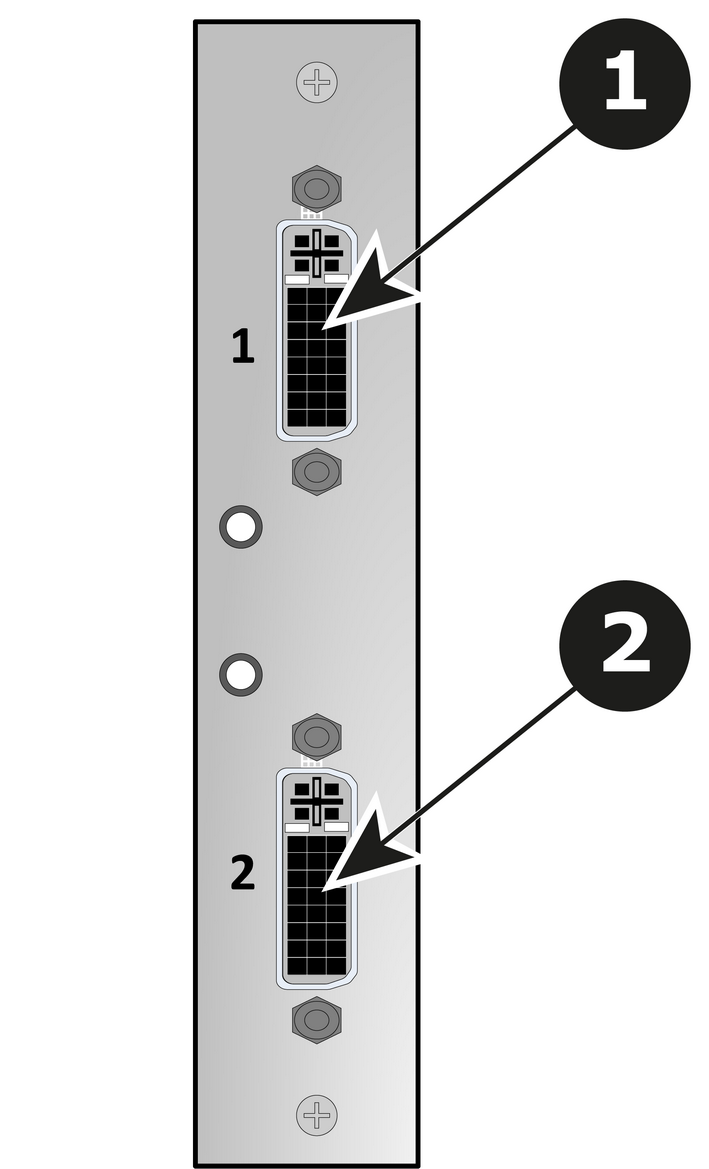
Image 4–5 Dual Link DVI Input Card Rear Panel
1DVI-I dual-link connector — DVI 1 with an LED that turns on green when a valid sync has been detected
2DVI-I dual-link connector — DVI 2 with an LED that turns on green when a valid sync has been detected
Features
Specifications
DVI

Digital Visual Interface is a display interface developed in response to the proliferation of digital flat panel displays.

The digital video connectivity standard that was developed by DDWG (Digital Display Work Group). This connection standard offers two different connectors: one with 24 pins that handles digital video signals only, and one with 29 pins that handles both digital and analog video. This standard uses TMDS (Transition Minimized Differential Signal) from Silicon Image and DDC (Display Data Channel) from VESA (Video Electronics Standards Association).

DVI can be single or dual link.