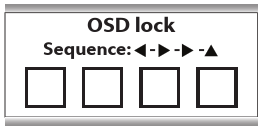
About the control lock
As described in “Control lock”, the control lock can be enabled to avoid unwanted access to the front and OSD menu. When control is locked, the front menu cannot be accessed but will make the OSD lock window appear. Only after pressing the correct sequence of keys, the front menu can be accessed.