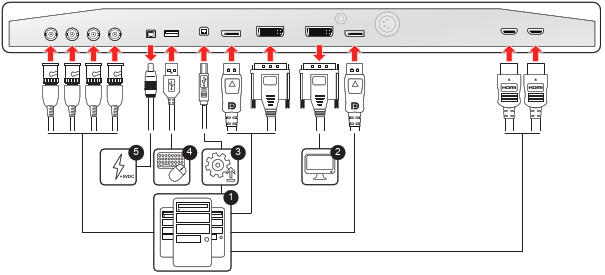
To connect the interfaces
- Connect one or more video source(s) to the corresponding video inputs of the display. For a list of supported video inputs, see “Technical specifications” . See “SDI config” about the possible SDI configuration modes.
- Screen image clone: The entire active image on the screen (including OSD) can be duplicated to a FHD (1080p/1080i) signal on the DVI output connector, to which an additional DVI video sink can be connected.
- Connect the USB2.0 type B interface with a workstation to use the remote control protocol, to update the display firmware, or to be able to connect any USB peripheral with the USB interfaces of the display (see next step).
- Use any USB peripheral (keyboard, mouse, webcam, ...) by connecting it to the available USB interfaces.
- Connector +5 VDC - 2A power out for accessory (Mating connector HIROSE RP34L-5PA- 2SC(1857)(71)).