OSD menu structure explained
Below is an example of the OSD menu structure:
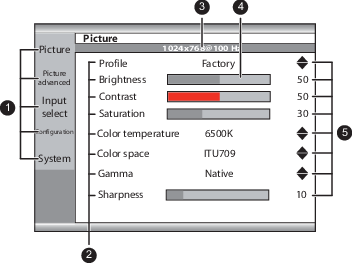
- Menu pages
- Sub-menus (menu items)
- Status bar
- Selector/Slider
- Item


Below is an example of the OSD menu structure:

 key to open the OSD menu.
 or
or  key to scroll to the desired menu page.
 key to select the top menu item that will be highlighted. or keys to move to other Menu Items, then press the key to select it.
 or keys to adjust the item value, then press the key to confirm. or keys to select the desired option then press the key to confirm. or key to select other Menu items or exit from the Menu page by pressing the key.