3.6 Creating group

About creating a group

Groups allow devices to be organized for easier control. Groups can be created manually or selected from existing options in the system.

How to create
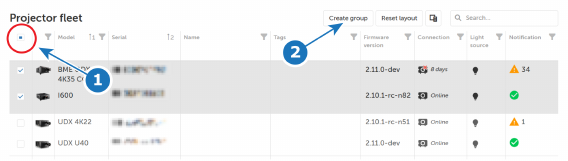
  1. Select the desired devices by checking the boxes in front of each device line.

    Tip: To select all devices, select the checkbox (reference 1) above the list of devices.
    Image 3–9
  2. Click on Create group tab (reference 2, Image 3–9).

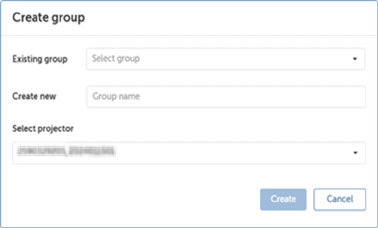
    The Create group window will be prompted.

    Image 3–10
  3. Add devices to a group

    • To add devices to an existing group, select the group name from the Existing group drop-down list.
    • To create a new group, enter the group name in the Create new field.
    Tip: Devices can also be added using the Select projector drop-down menu in the Create Group window.
  4. Click Create.
Note: Groups can be viewed and managed from the Group view tab. For more information, see “Group view ”.